
Bubble Performance Guide: Why Your App Takes 30 Seconds to Load
image: "/blog/performance-slow-loading.png"
Bubble Performance Guide: Why Your App Takes 30 Seconds to Load
You open your app on your phone. The splash screen appears. You wait.
And wait.
And wait.
Thirty seconds later, maybe forty, your app finally loads. By then, half your users have already left.
"takes a solid 30-40 sec on the splash screen before going to index view" — miracle, Bubble Forum
You're not alone. This is the reality for thousands of Bubble developers who built successful apps only to discover they can't actually use them on mobile devices.
"On my iPhone 14 pro, my app takes on average 8 seconds to load" — thibautranger, Bubble Forum
Eight seconds on an iPhone 14 Pro—one of the fastest phones ever made. Imagine what it's like on a budget Android device. Imagine what your users in emerging markets experience.
"on my Xiaomi Redmi A2, my app always take over a minute to load" — thibautranger, Bubble Forum
Over a minute. For context, Google's research shows that 53% of mobile users abandon sites that take longer than 3 seconds to load. You're not losing some users—you're losing most of them before they even see your product.
The worst part? You look at your competitors and feel the gap:
"Airbnb loads in 2.5 seconds, booking.com loads in 1.5 seconds" — thibautranger, Bubble Forum
Those apps handle millions of users, complex real-time data, sophisticated UI. And they load in under 3 seconds. Your Bubble app with a fraction of the complexity takes 10x longer.
This guide explains exactly why Bubble apps are slow, which optimizations actually work, and—critically—when optimization isn't enough and what to do next.
Why Bubble Apps Are Inherently Slower Than Custom Code
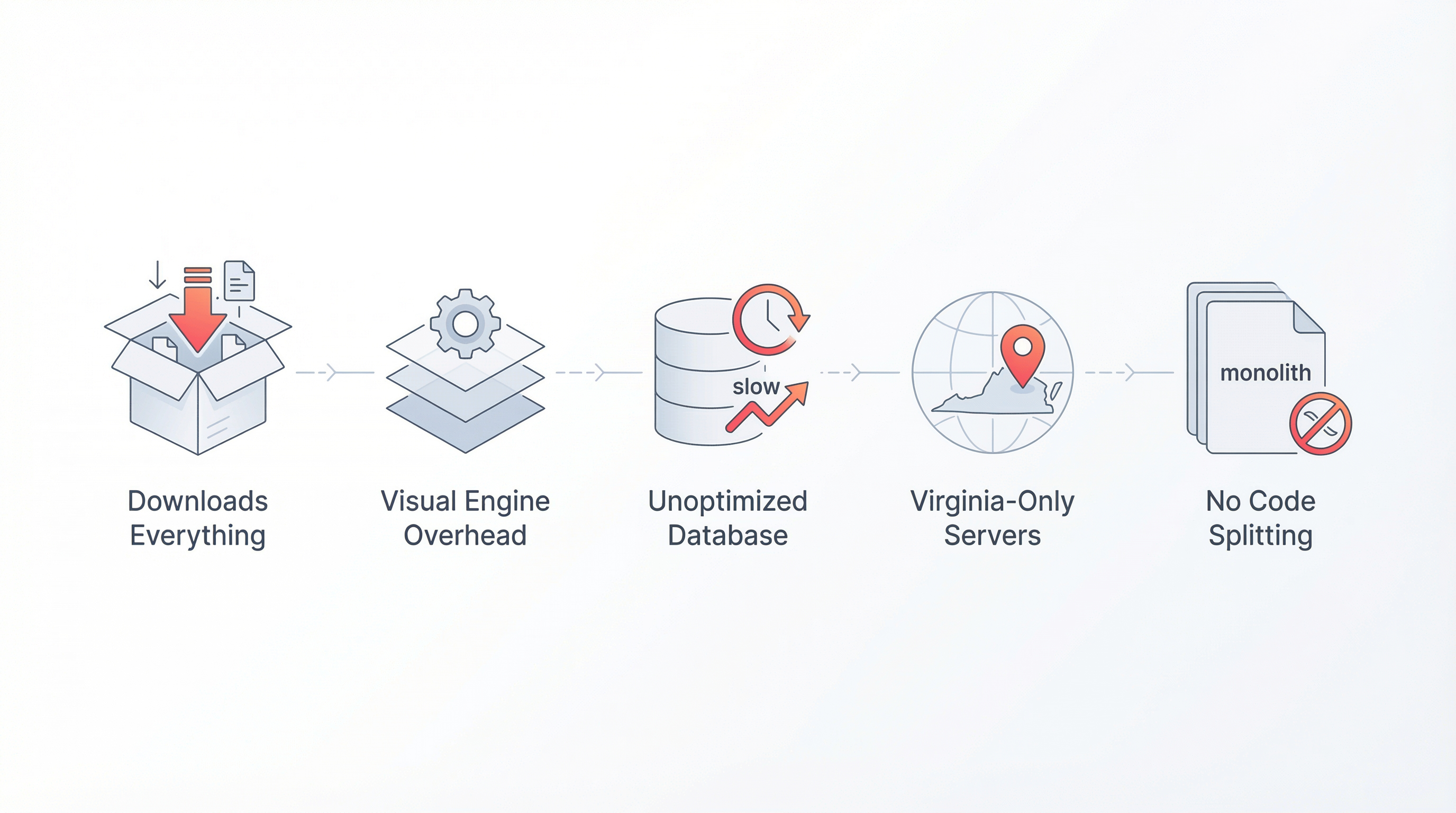
Before we dive into fixes, you need to understand the root causes. Bubble's speed problems aren't bugs—they're architecture decisions.
1. Bubble Downloads Your Entire App on First Load
When you visit a Next.js or React app, the server sends only the code needed for that specific page. Other pages load on-demand as you navigate.
Bubble works differently. On first visit, your browser downloads:
- The entire Bubble runtime engine (~2-4 MB)
- All your app's workflows and logic
- All element definitions across all pages
- All style definitions
- All data type schemas
Before a single pixel appears, your user's phone is downloading megabytes of JavaScript they don't need yet—and may never need.
This is why the splash screen hangs. Your app isn't loading slowly; it's downloading everything before loading anything.
2. Bubble's Visual Engine Has Massive Overhead
Custom code developers write precise instructions: "Create a div. Add this text. Apply this style." The browser executes these directly.
Bubble interprets your visual design at runtime. Every element goes through layers of abstraction:
- Parse Bubble's internal representation
- Resolve dynamic expressions
- Calculate responsive positioning
- Apply conditional visibility
- Render the final HTML/CSS
Each layer adds milliseconds. With hundreds of elements, those milliseconds compound into seconds.
3. Database Queries Aren't Optimized
In PostgreSQL, you write a query and the database optimizes it. Indexes accelerate lookups. Query planners choose efficient execution paths.
Bubble's database doesn't work like traditional databases. When you "Do a search for," Bubble:
- Translates your visual query to its internal format
- Sends it to Bubble's servers
- Processes it through Bubble's query layer
- Returns results through Bubble's API layer
- Formats results for your page
Each query has roundtrip latency plus processing overhead. With multiple searches per page, load times multiply.
4. Everything Runs Through Bubble's Servers
Your Bubble app doesn't run on your user's device. It runs on Bubble's servers in AWS US-East (Virginia).
For users in Europe, that's 80-100ms roundtrip latency per request. For users in Asia, 200-300ms. For users in Australia, even more.
Custom code lets you deploy globally via CDNs. Bubble forces everyone through Virginia.
5. You Can't Control What Gets Downloaded
Modern web frameworks support code splitting, lazy loading, and tree shaking. You ship only what's needed.
Bubble bundles everything together. That workflow you created for your admin panel? It's downloaded by every user, including the ones who will never see it.
The Real Performance Numbers
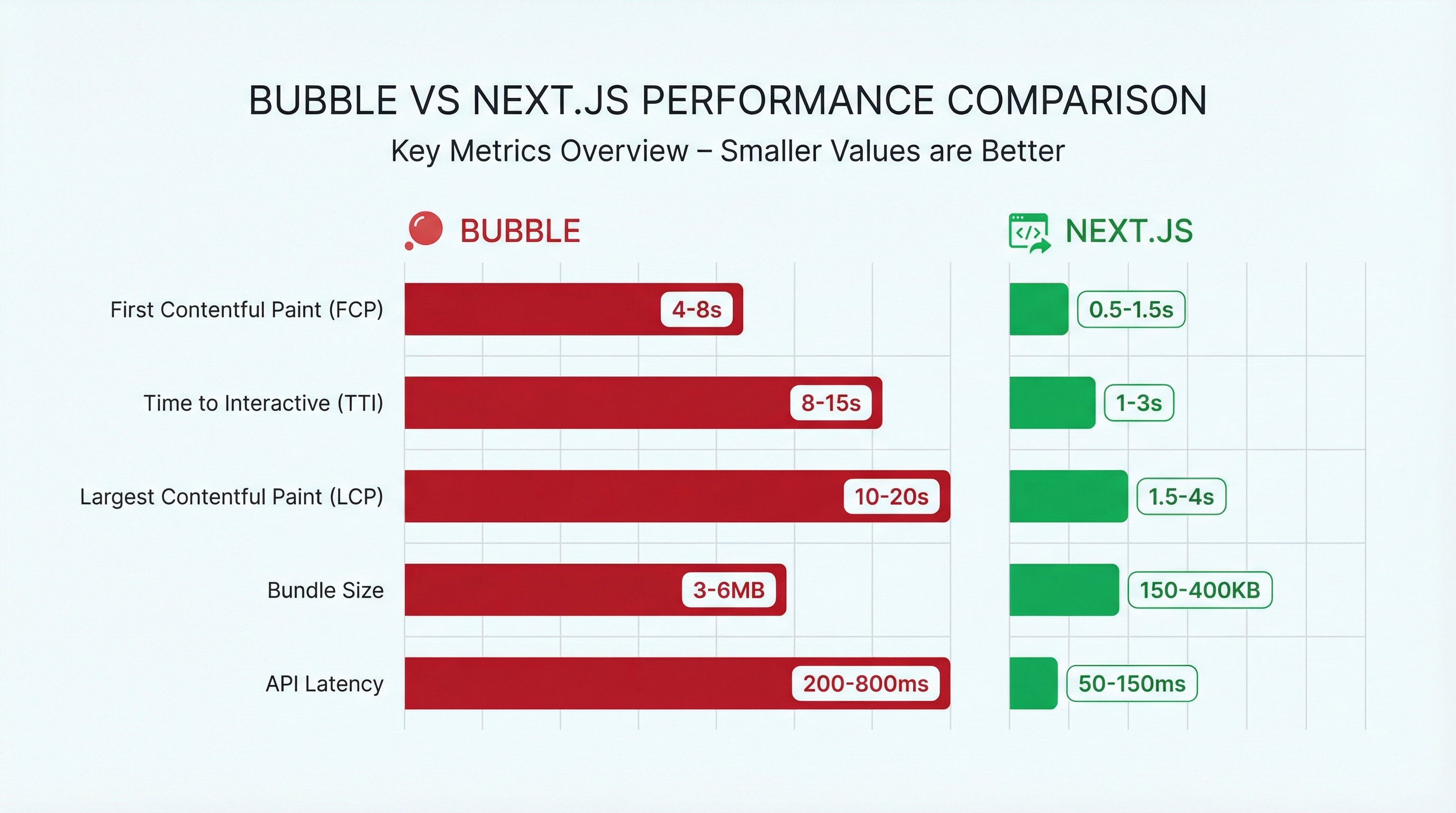
Let's quantify how slow Bubble actually is compared to alternatives:
| Metric | Bubble App (Typical) | Next.js App (Typical) | Difference |
|---|---|---|---|
| First Contentful Paint | 4-8 seconds | 0.5-1.5 seconds | 4-8x slower |
| Time to Interactive | 8-15 seconds | 1-3 seconds | 5-8x slower |
| Largest Contentful Paint | 10-20 seconds | 1.5-4 seconds | 5-6x slower |
| JavaScript Bundle Size | 3-6 MB | 150-400 KB | 10-20x larger |
| API Latency (per query) | 200-800ms | 50-150ms | 4-5x slower |
These numbers come from real performance audits of migrated apps. The gap isn't small—it's catastrophic for user experience.
"It's dealbreakingly slow." — brenton.strine, Bubble Forum
Brenton isn't being dramatic. For many use cases, Bubble's performance genuinely breaks the deal.
Performance Optimizations That Actually Work
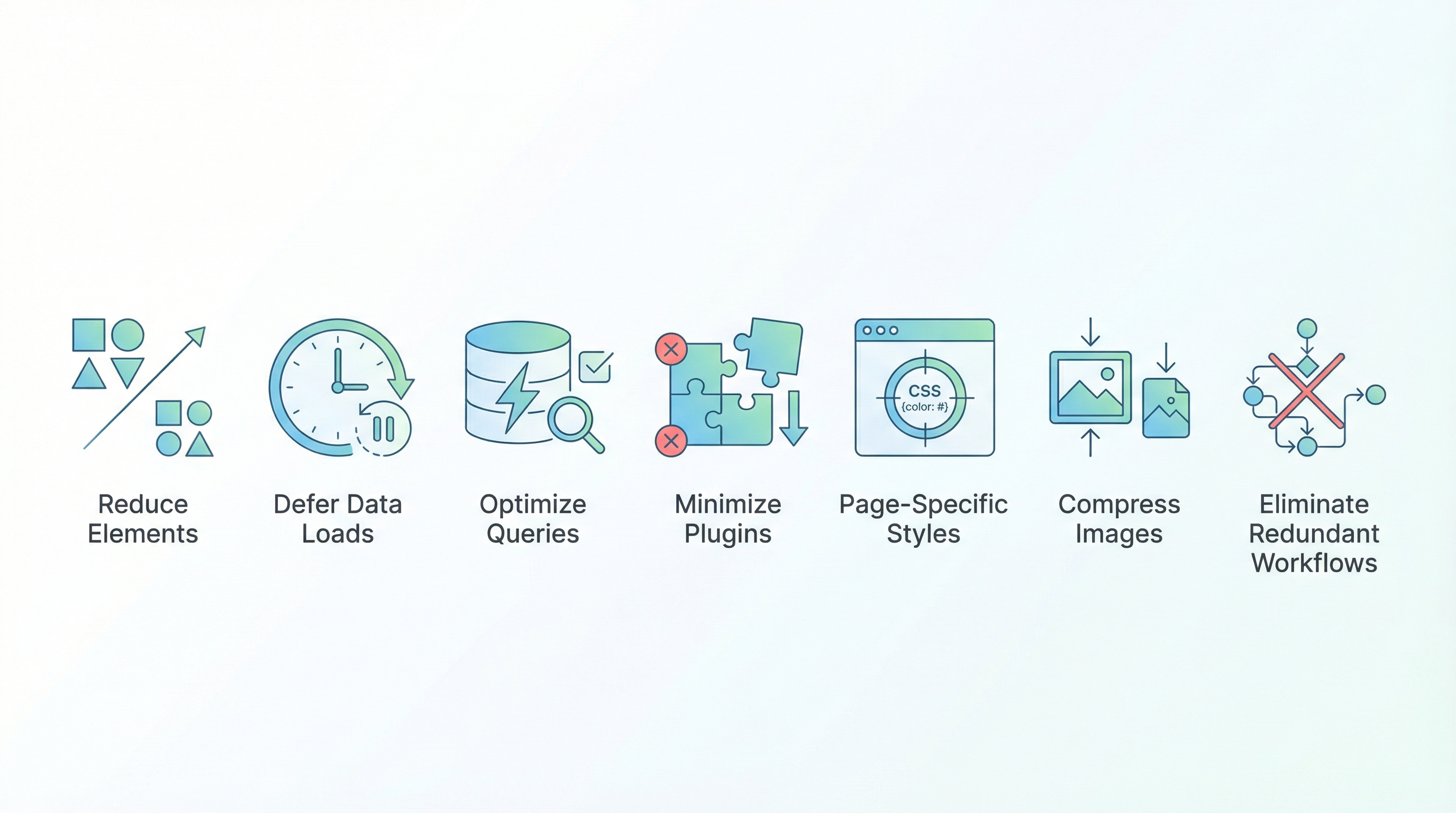
Despite the architectural limitations, there are optimizations that genuinely help. We'll start with the high-impact fixes.
1. Reduce Initial Page Elements
The single biggest factor in Bubble load time is how many elements exist on your first page.
The Problem:
Every element on your landing page—visible or not—gets processed during initial load. If your homepage has 300 elements, all 300 get computed before anything appears.
The Fix:
- Audit your landing page element count (Editor → Search → Elements)
- Remove unused elements (copy/pasted remnants, hidden test elements)
- Move non-essential elements to separate pages
- Use reusable elements strategically (they load separately)
- Target: Under 100 elements on your landing page
Expected Impact: 20-40% improvement in initial load time
2. Defer Non-Critical Data Loads
Most Bubble apps load all data immediately. Users wait for data they won't see for several scrolls.
The Problem:
If your page has 5 repeating groups, all 5 start loading simultaneously. The page won't render until all queries complete.
The Fix:
Use conditional data sources:
Repeating Group's data source:
  If "PageLoadComplete" is yes: Do a search for Products
  If "PageLoadComplete" is no: empty
Then set "PageLoadComplete" to yes after a 500ms delay once the page loads.
This renders the page structure immediately, then fills in data. Users see something instantly instead of nothing for 10 seconds.
Expected Impact: 30-50% perceived improvement in load time
3. Optimize Your Search Queries
Bubble searches are deceptively expensive. Every constraint adds processing time.
The Problem:
Complex searches with multiple constraints, sorted results, and nested filters can take 1-2 seconds each. Chain a few together and you've added 5+ seconds to page load.
The Fix:
- Add database indexes to fields you search frequently
- Reduce constraint count — combine fields or restructure data
- Use :first item instead of :filtered when you only need one result
- Avoid nested searches — "Search for Users where Company = Search for Companies:first item" is two queries
- Pre-calculate and store values instead of computing them on display
Expected Impact: 20-60% improvement in data load time, depending on query complexity
4. Minimize Plugin Count
Plugins are convenient, but they add weight.
The Problem:
Each plugin adds JavaScript that loads on every page. Some plugins add megabytes of code. Even plugins you're not using on a page still load.
The Fix:
- Audit your plugins (Settings → Plugins)
- Delete plugins you're not using
- Replace heavy plugins with lighter alternatives or custom code
- Check if native Bubble features can replace plugin functionality
Biggest offenders: Rich text editors, charting libraries, map integrations, video players
Expected Impact: 10-30% improvement, depending on which plugins you remove
5. Use Page-Specific Styles (Not App-Wide)
Many Bubble developers define all styles at the app level for consistency. This seems smart but hurts performance.
The Problem:
App-wide styles load on every page. That button style you use on your settings page? It's downloaded on your landing page too.
The Fix:
For performance-critical pages (landing page, main dashboard):
- Define styles locally on those pages
- Remove style dependencies from app-level definitions
- Accept some style inconsistency in favor of speed
This is advanced optimization. Only worth it if you've exhausted other options.
Expected Impact: 5-15% improvement on critical pages
6. Compress and Resize Images Properly
Images are often the largest assets on Bubble pages, but they're rarely optimized.
The Problem:
Users upload 5MB photos. Bubble stores them as-is. Your page tries to display a 4000x3000 pixel image in a 200x200 thumbnail container.
The Fix:
- Compress uploads using the Imgix plugin or similar
- Use dynamic image resizing — Bubble supports URL parameters:
yourimage?w=200&h=200 - Lazy load images below the fold
- Convert to WebP format for smaller file sizes
- Implement progressive loading — show blurred placeholder, then full image
Expected Impact: 20-40% improvement if images are a significant part of your page
7. Eliminate Redundant Workflows
Workflow bloat is invisible but costly.
The Problem:
Over time, you accumulate workflows that run but do nothing useful—logging, analytics, abandoned features. Each workflow fires and processes, adding load time.
The Fix:
- Audit every "Page is Loaded" workflow
- Audit every "Do when condition is true" workflow
- Remove logging/testing workflows from production
- Combine related workflows
- Delete unused workflows entirely
Expected Impact: 5-20% improvement, often with noticeable "snappier" feel
Advanced Optimizations (Diminishing Returns)
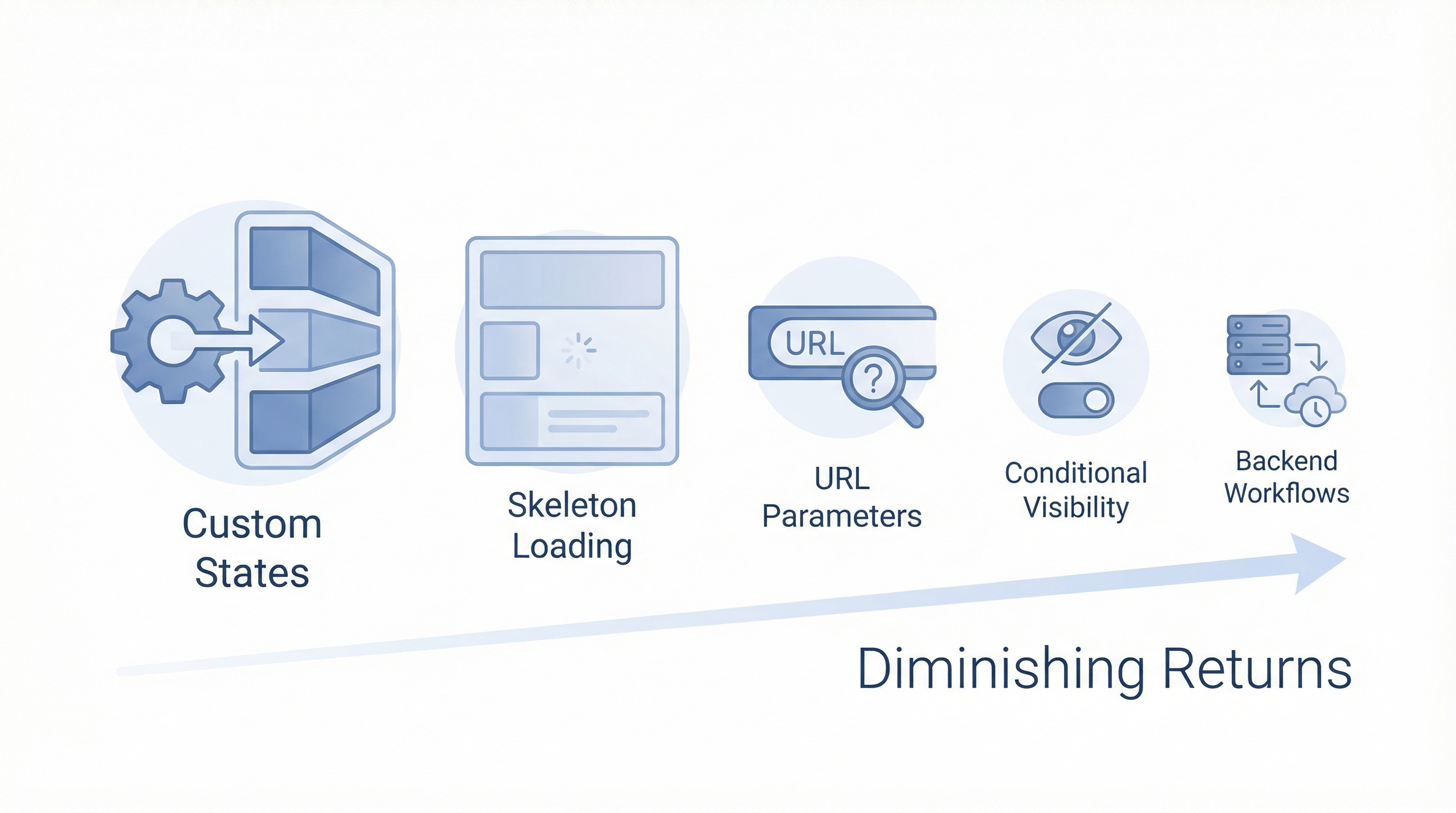
These help, but the gains are smaller. Implement these after you've done the basics.
8. Use Custom States Instead of Database for Temporary Data
Database writes are slow. If you're storing temporary session data in the database, switch to custom states.
9. Implement Skeleton Loading States
You can't make Bubble faster, but you can make it feel faster. Show skeleton placeholders while data loads.
10. Use URL Parameters for Navigation State
Reloading full pages is slow. Use URL parameters and conditionally show/hide groups for single-page app behavior.
11. Minimize Conditional Visibility Logic
Every "This element is visible if..." condition evaluates on load. Simplify complex visibility chains.
12. Use Backend Workflows for Heavy Processing
Move intensive operations to backend workflows. They run on Bubble's servers without blocking the UI.
When Optimization Isn't Enough
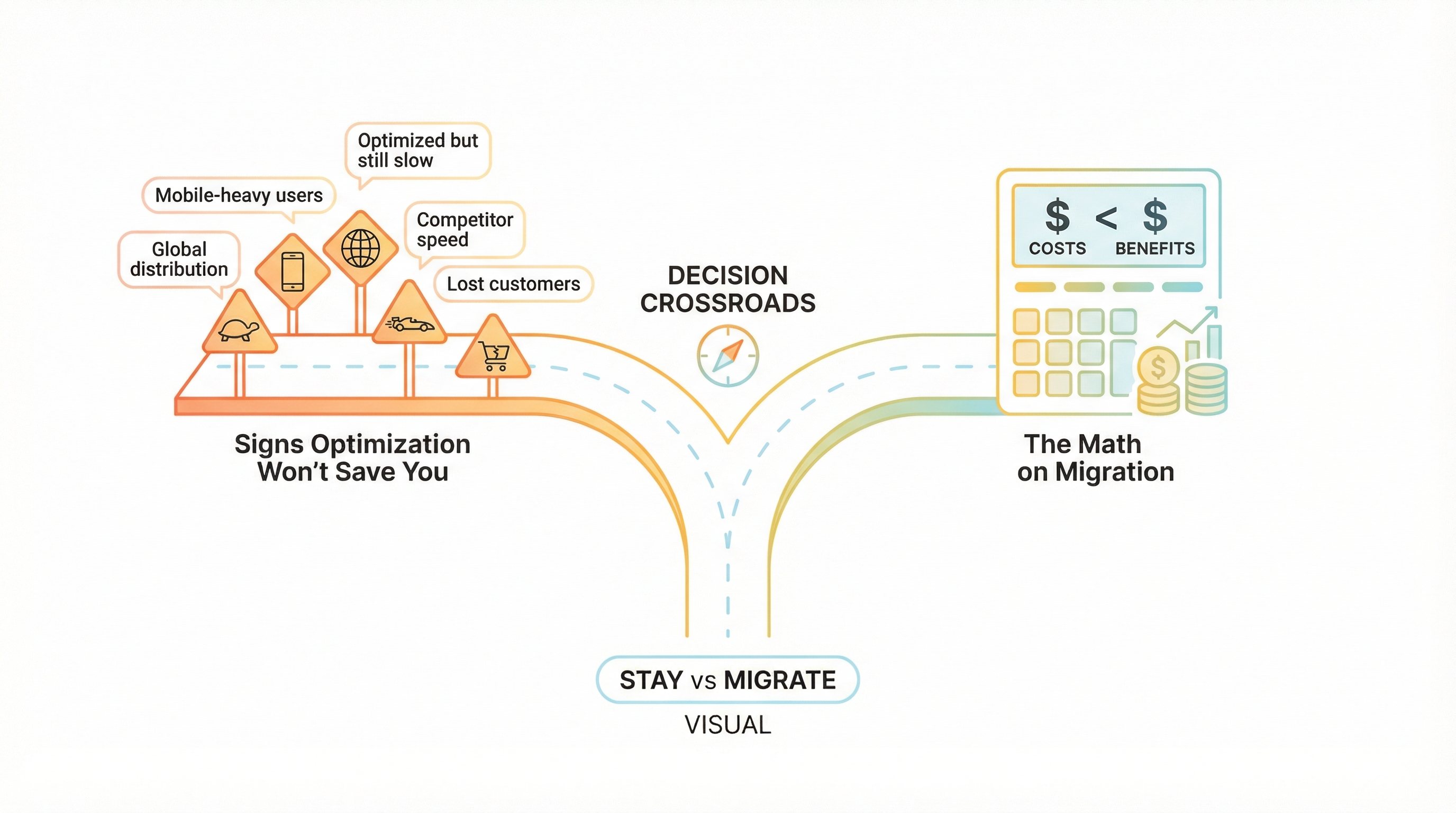
Here's the uncomfortable truth: sometimes optimization doesn't fix the problem.
You can spend weeks implementing every trick in this guide. You might get your load time from 20 seconds to 12 seconds. Maybe even 8 seconds if you're aggressive.
But 8 seconds is still 4x slower than your competitors. 8 seconds still loses 53% of mobile users. 8 seconds is still:
"I don't see myself releasing my app to my users with these load times" — thibautranger, Bubble Forum
When thibautranger wrote that, he'd already optimized his app. He'd already followed the best practices. The problem isn't optimization—it's architecture.
Signs That Optimization Won't Save You
-
You've already optimized and you're still above 5 seconds
- The remaining slowness is Bubble's runtime, not your code
-
Your user base is mobile-heavy
- Mobile compounds all of Bubble's weaknesses
-
Your users are geographically distributed
- Bubble's Virginia-only servers add unavoidable latency
-
Speed is a competitive differentiator in your market
- Your competitors will always be faster on custom code
-
Users have complained about speed and you've lost customers
- Real revenue impact requires real solutions
The Math on Migration
Consider the cost comparison:
Staying on Bubble:
- Continue losing users to slow load times (unquantified but real)
- Keep paying escalating Workload Unit costs
- Remain locked into one platform's pricing decisions
- No improvement path beyond marginal optimization
Migrating to custom code:
- One-time investment
- 4-8x performance improvement
- Predictable hosting costs (typically $20-50/month vs $100-500+)
- Full control over optimization
After migration, apps that took 30-40 seconds in Bubble typically load in 2-4 seconds:
"We have moved out completely from bubble using supabase and next js. possibilities are endless" — munaeemmmm, Bubble Forum
"no need to worry about costs" — munaeemmmm, months after migration
"custom code is always better...not an opinion, its a fact" — thuto.co, Bubble Forum
Performance isn't the only factor, but for apps where speed matters, it's often the deciding factor.
Frequently Asked Questions
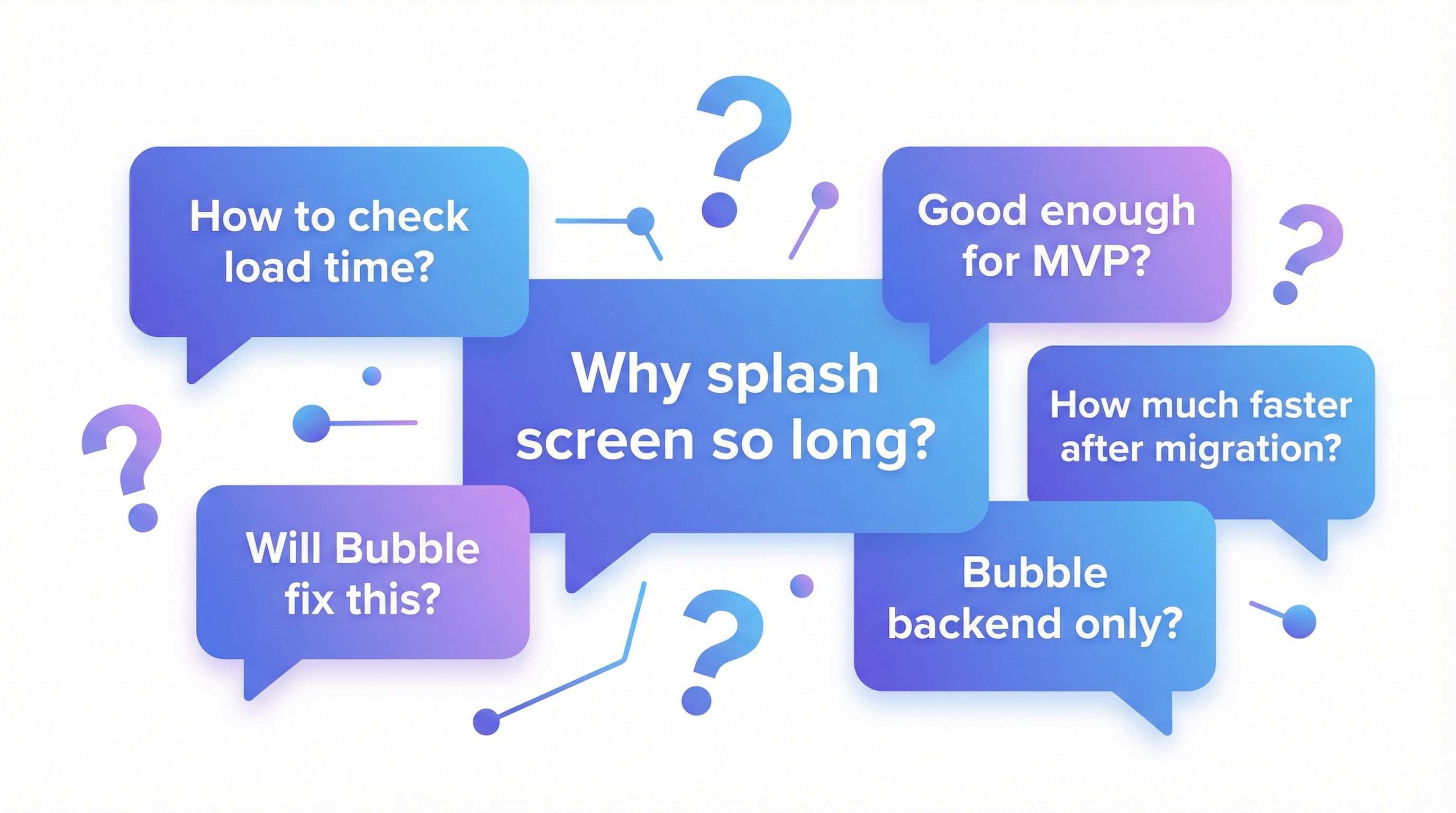
Why does my Bubble app take so long on the splash screen?
The splash screen appears while Bubble downloads and initializes your entire application—all pages, workflows, and data type definitions. This "download everything upfront" approach is fundamentally slower than modern frameworks that load code on-demand. The more complex your app, the longer the splash screen.
How do I check my Bubble app's actual load time?
Use Google's PageSpeed Insights (pagespeed.web.dev) or Chrome DevTools' Performance tab. Key metrics to watch: First Contentful Paint (when something appears), Time to Interactive (when users can click), and Largest Contentful Paint (when main content loads). Aim for under 3 seconds on each.
Will Bubble ever fix their performance problems?
Bubble has made incremental improvements, but the core architecture limits what's possible. Their documentation acknowledges that complex apps will be slower. They've optimized the platform, but the fundamental design decisions—interpreted visual language, centralized servers, monolithic downloads—can't change without rebuilding the platform.
Is Bubble performance good enough for MVPs?
For early testing with limited users, Bubble performance is usually acceptable. The problems emerge at scale or when competing against faster alternatives. If you're validating an idea, Bubble works. If you're building a business, you'll likely need to migrate once you have traction.
How much faster will my app be if I migrate to Next.js?
Based on migrations we've done, most apps see 4-8x improvement in load time. Apps that took 15-20 seconds in Bubble typically load in 2-4 seconds after migration. The improvement comes from smaller bundle sizes, optimized database queries, global CDN deployment, and framework-level optimizations.
Can I just use Bubble for the backend and build a faster frontend?
This is a common workaround. You can use Bubble purely for its visual database and workflows, then build a custom frontend that calls Bubble's API. This gives you better frontend performance but you still hit Bubble's API latency. It's a middle ground—faster than pure Bubble, slower than full custom code.
The Performance Decision Framework
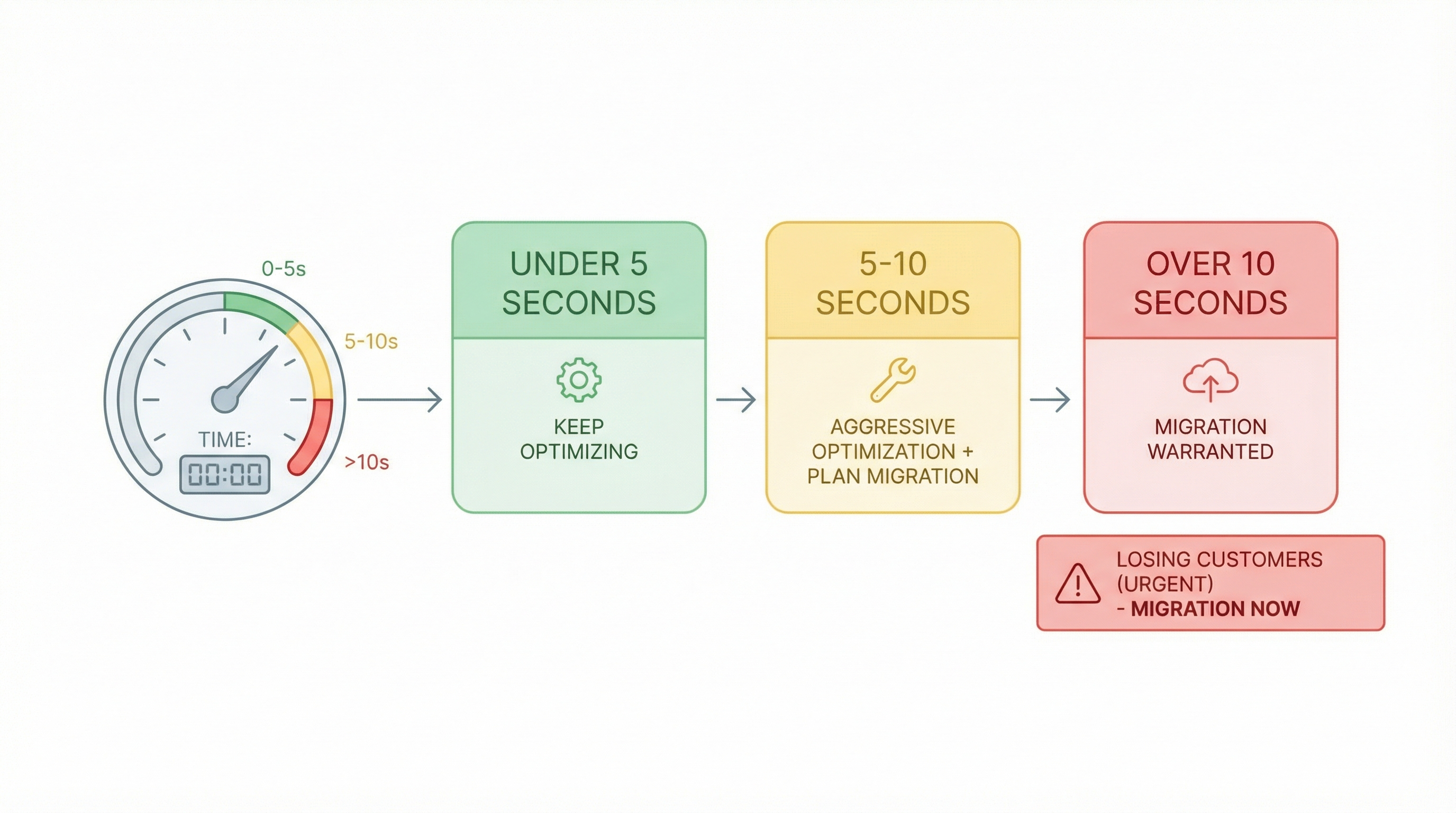
Here's how to think about your options:
If your load time is under 5 seconds:
- Continue optimizing with the techniques above
- You're within acceptable range for most users
If your load time is 5-10 seconds:
- Implement all optimizations aggressively
- Monitor user feedback and conversion rates
- Plan for potential migration if optimization plateaus
If your load time exceeds 10 seconds:
- You're actively losing users
- Optimization may help but likely won't solve the problem
- Serious consideration of migration is warranted
If performance is costing you customers:
- The cost of migration is less than the cost of lost business
- Every day you wait is revenue lost
What Migration Looks Like
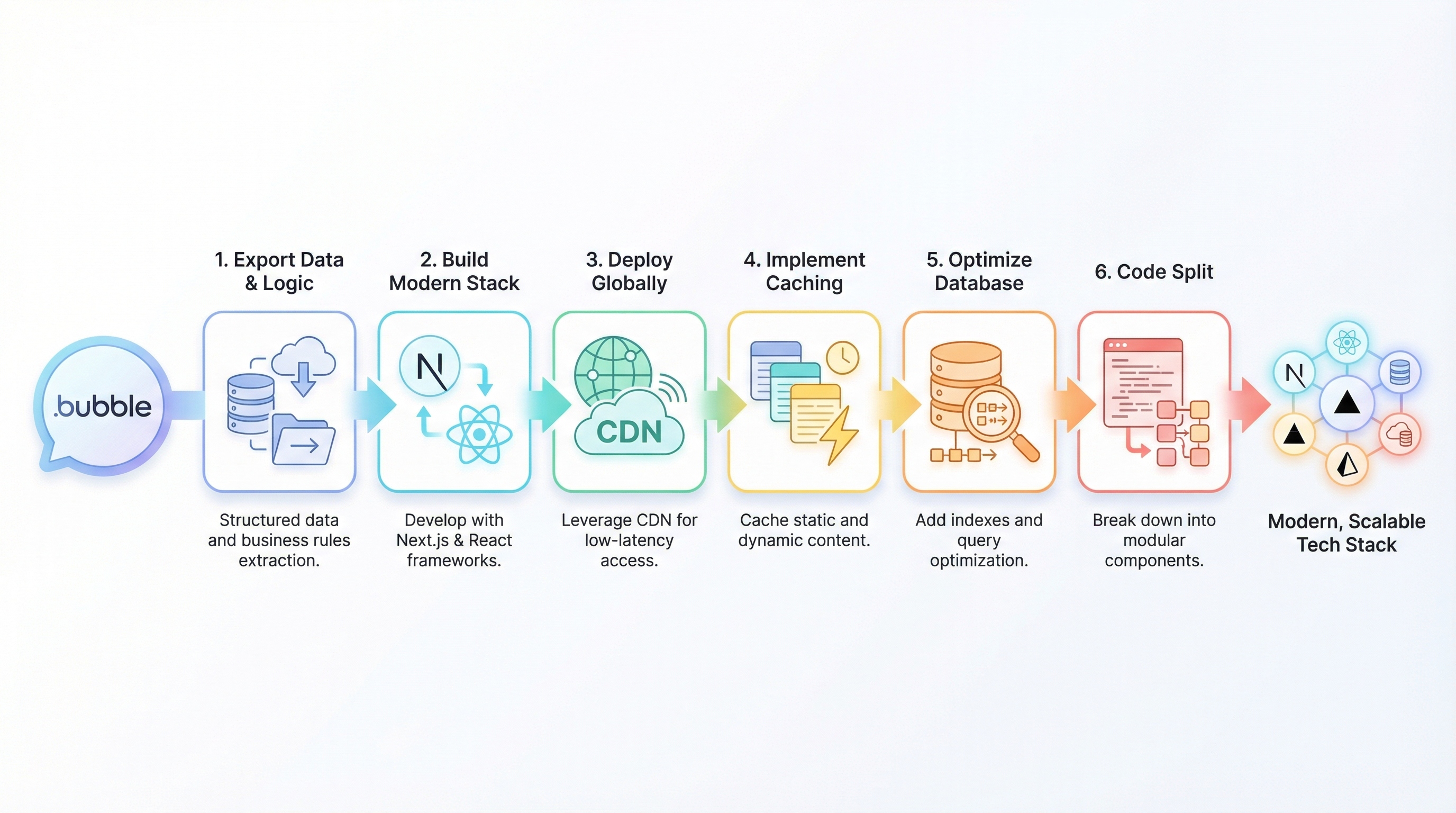
If you've decided optimization isn't enough, here's what a performance-focused migration typically involves:
- Export your data and logic — Preserving everything you built
- Build on a modern stack — Next.js, React, Vue with proper optimization
- Deploy globally — CDN distribution so users everywhere load fast
- Implement proper caching — Static generation where possible
- Optimize database queries — Real indexes, efficient joins
- Code split aggressively — Load only what's needed per page
The result: An app that does everything yours does, but loads in 2 seconds instead of 20.
"Load times decreased by over 70%" — Meerako case study, Bubble to Next.js migration
"Operations that took minutes in Bubble now took seconds" — Meerako case study
"New architecture could handle 100x their previous user load with ease" — Meerako case study
Taking the Next Step
If your Bubble app's performance is frustrating your users—and you've tried optimization without meaningful improvement—you have a choice to make.
You can continue accepting 30-second load times, continue losing users to faster competitors, continue watching your Bubble costs climb while performance stays stuck.
Or you can do what stuart8 did. What munaeemmmm did. What Orbit did after 5 years on Bubble. What hundreds of founders do when they realize the platform that got them started isn't the platform that will scale.
Get a free performance assessment → — Send us your app URL. We'll benchmark your actual load times, identify your biggest bottlenecks, and tell you honestly whether optimization can fix it or whether migration makes sense. Sometimes the answer is "stay and optimize." We'd rather tell you that upfront.
Related reading:
Ready to talk migration?
Get a free assessment of your Bubble app. We'll tell you exactly what to expect — timeline, cost, and any potential challenges.