
Bubble to Supabase + Next.js: The Complete Migration Path
You've made the decision. The workload unit bills, the 8-second load times, the investor eyebrows—you've seen enough. You're ready to leave Bubble.
But here's the thing: "leaving Bubble" isn't a destination. It's a starting point. The real question is: leave Bubble for what?
After working with dozens of founders navigating this exact transition, one stack keeps emerging as the clear winner for most Bubble migrants:
Supabase + Next.js.
"We have moved out completely from bubble using supabase and next js. possibilities are endless" — munaeemmmm, Bubble Forum
That quote captures something important. Not just "we migrated"—but "possibilities are endless." The constraints that shaped your product decisions on Bubble? They evaporate.
"I never thought of going back to bubble" — munaeemmmm, months after migration
This isn't buyer's remorse talking. This is someone who discovered what building without artificial limits feels like.
This guide is the most comprehensive resource available for migrating from Bubble to Supabase + Next.js. We'll cover every layer: database, authentication, file storage, APIs, frontend, and deployment. By the end, you'll understand exactly what the migration involves and whether it's right for your app.
Why Supabase + Next.js? (The Migration-Friendly Stack)
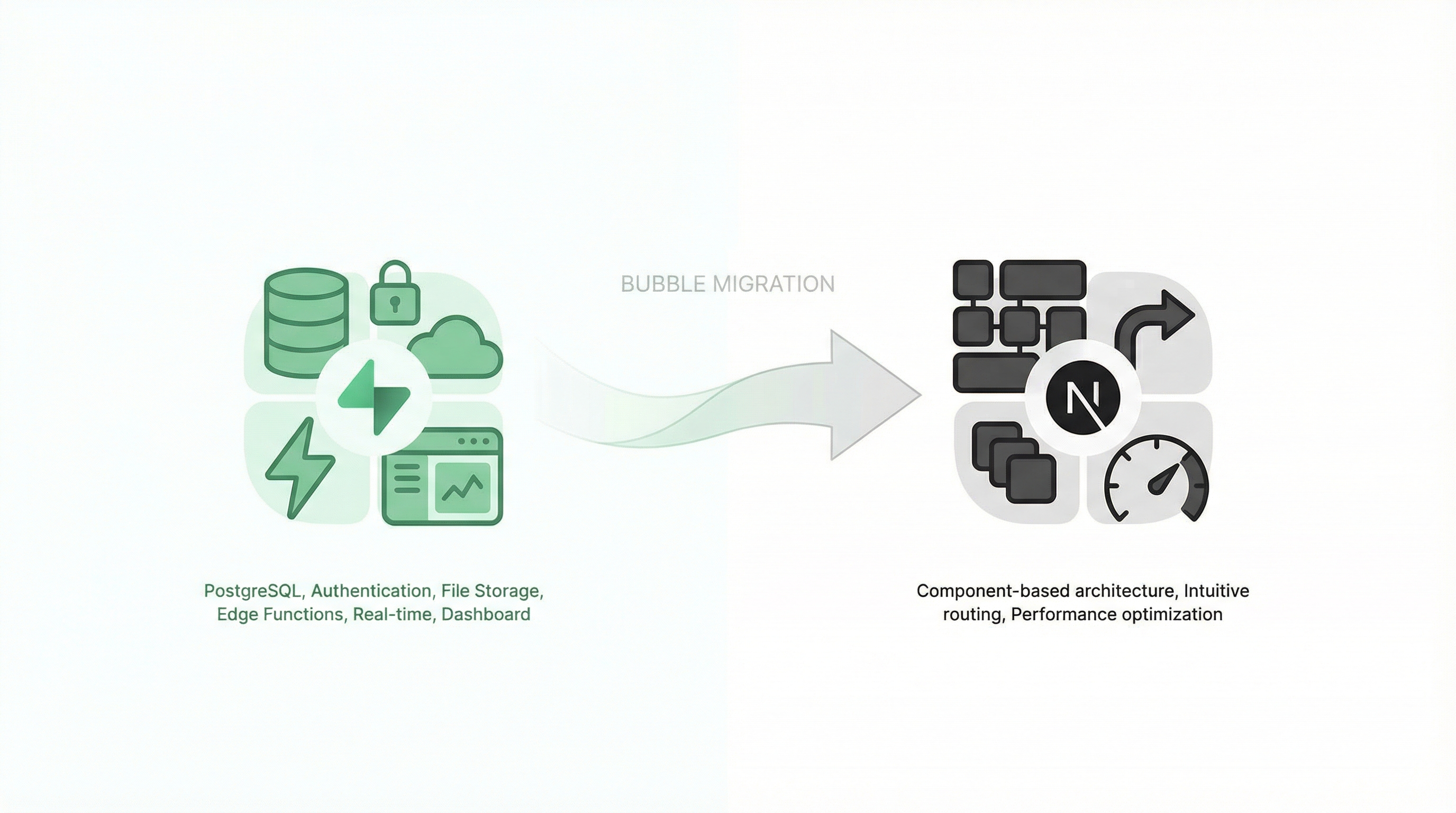
Before diving into the how, let's address the why. What makes this particular stack so well-suited for Bubble refugees?
Supabase: The Backend Bubble Founders Actually Understand
Supabase bills itself as "the open-source Firebase alternative," but for Bubble users, a better description might be: "what Bubble's backend should have been."
What Supabase gives you:
- PostgreSQL database — Real, industry-standard SQL database you can query directly
- Built-in authentication — Email/password, OAuth, magic links, just like Bubble but better
- File storage — Upload, serve, and manage files with a proper CDN
- Edge functions — Backend logic without managing servers (like Bubble workflows, but faster)
- Real-time subscriptions — Live data updates without polling
- Row-level security — Privacy rules, similar to Bubble's but more powerful
- Dashboard — Visual interface for managing everything, like Bubble's data tab but better
The learning curve from Bubble to Supabase is gentler than you'd expect. You're still thinking in terms of users, data types, and access rules—just with industry-standard tools.
Pricing reality check:
- Free tier: 500 MB database, 1 GB storage, 50,000 monthly active users
- Pro ($25/month): 8 GB database, 100 GB storage, unlimited users
- Scaling: $0.125 per GB-month for database, $0.021 per GB for storage
Compare that to Bubble's $29-$349/month plans with unpredictable workload charges. A $25/month Supabase project can handle what costs $200+/month on Bubble.
Next.js: The Frontend Framework Bubble Prepared You For
Next.js is a React framework that handles the complexity of modern web development. For Bubble users, the appeal is immediate:
- Visual thinking still applies — Components in Next.js are like reusable elements in Bubble
- Routing is intuitive — Pages live in a
/pagesor/appfolder, just like they're named - No server config — Vercel deployment is as simple as Bubble's "deploy to live"
- Performance by default — Server-side rendering, automatic code splitting, image optimization
Most importantly: Next.js is what companies hire developers to build. When you're recruiting talent, "we use Next.js" opens doors that "we use Bubble" closes.
"I've lost over 90% of potential clients because I couldn't offer code ownership." — Orbit, Bubble Forum
With Next.js, you own the code. Every line. Forever.
Understanding the Architecture Translation
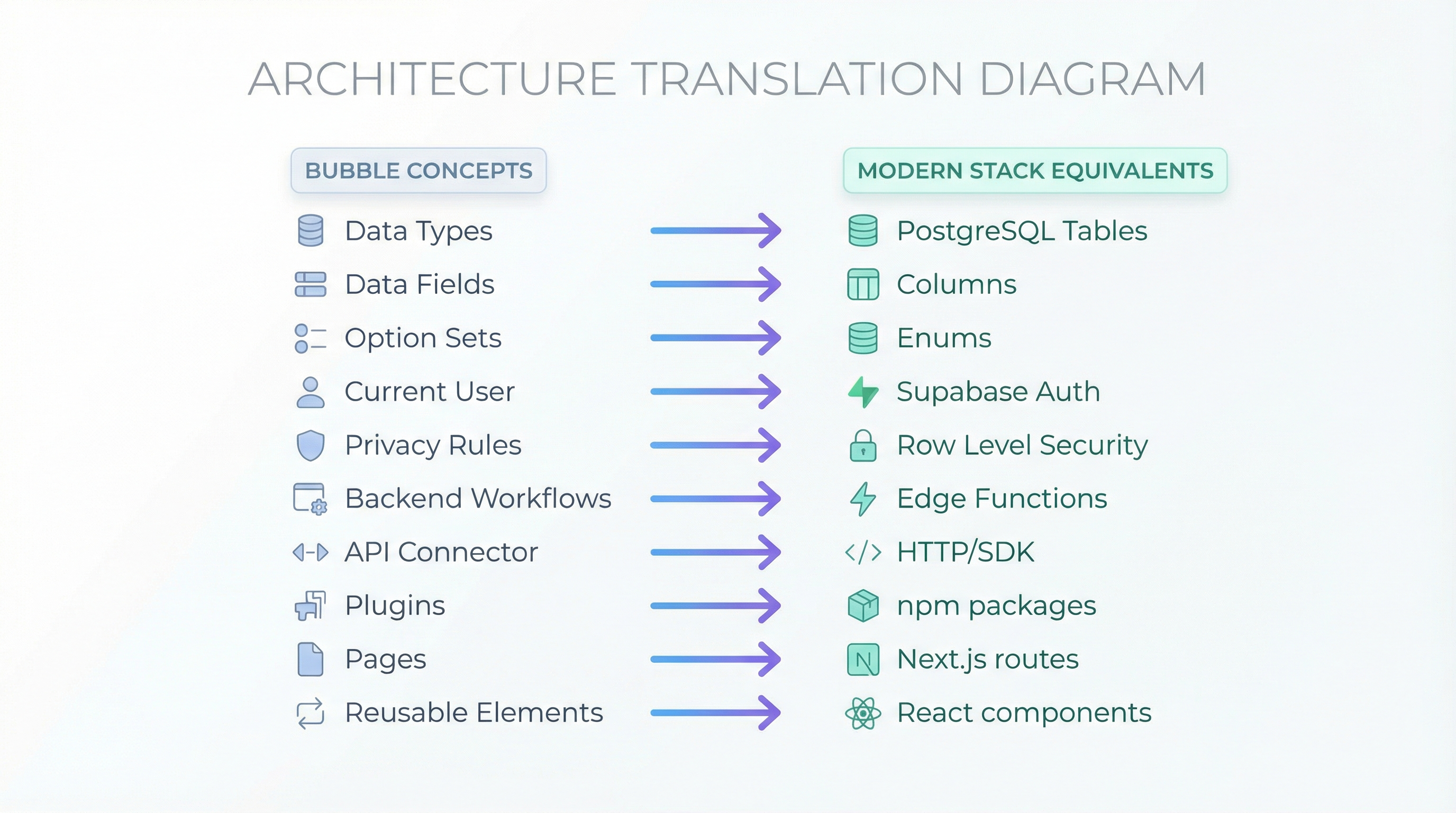
Before we migrate anything, let's understand how Bubble concepts map to Supabase + Next.js:
| Bubble Concept | Supabase + Next.js Equivalent |
|---|---|
| Data Types | PostgreSQL Tables |
| Data Fields | Table Columns |
| Option Sets | Enum types or lookup tables |
| Current User | Supabase Auth (useUser hook) |
| Privacy Rules | Row Level Security (RLS) policies |
| Backend Workflows | Edge Functions or API routes |
| Scheduled Workflows | Cron triggers + Edge Functions |
| API Connector | Direct HTTP calls or SDK |
| Plugins | npm packages |
| Pages | Next.js pages/routes |
| Reusable Elements | React components |
| Custom States | React state (useState) |
| URL Parameters | Next.js router params |
| File Uploads | Supabase Storage |
| Conditions/Filters | SQL WHERE clauses |
The concepts translate. The syntax changes.
Phase 1: Database Migration (Bubble → Supabase PostgreSQL)
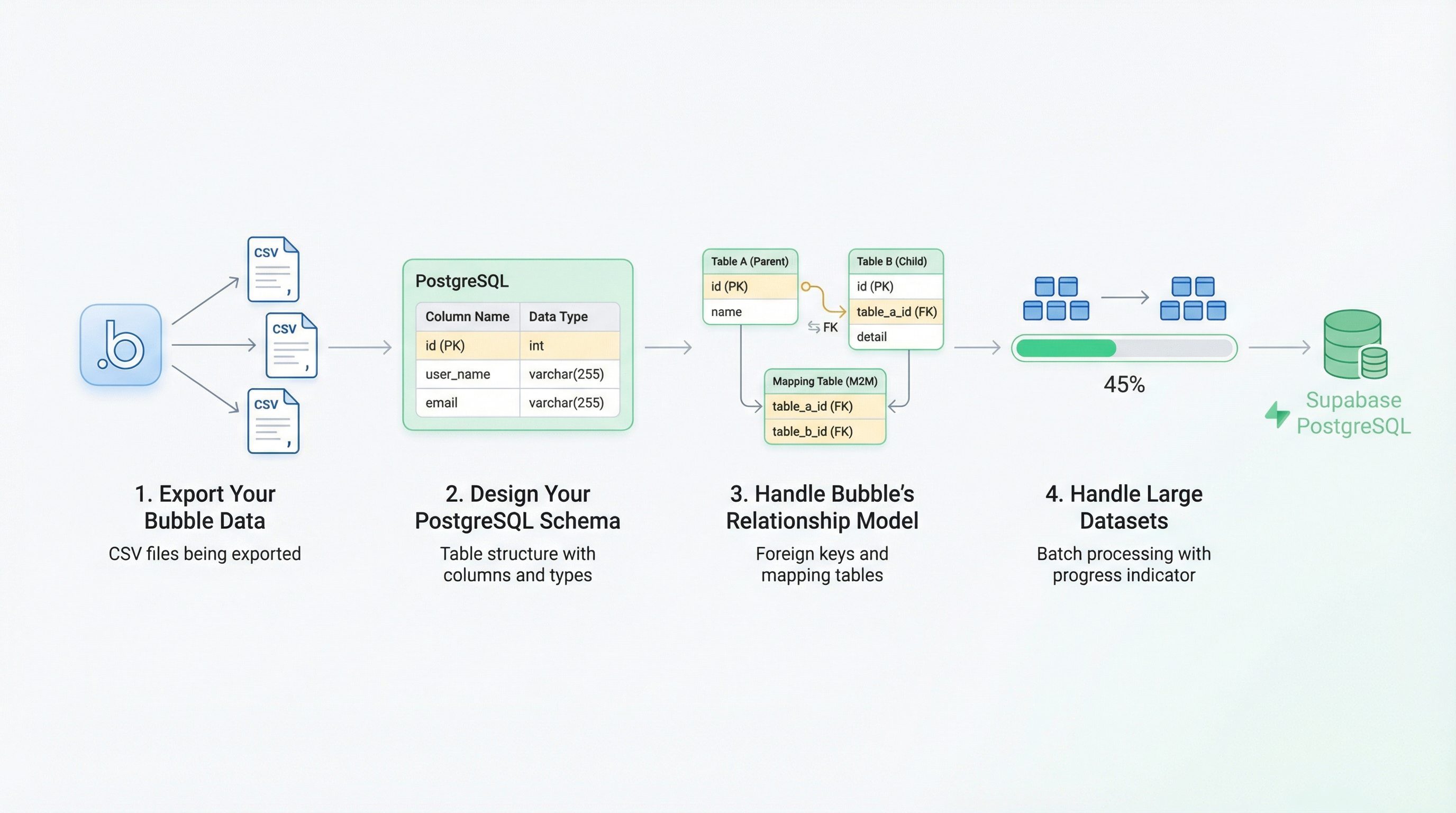
This is the foundation. Everything else depends on getting your data moved correctly.
Step 1: Export Your Bubble Data
In Bubble, go to Data → App Data and export each data type as CSV. Export:
- All data types (Users, your custom types, etc.)
- Include all fields
- Export in UTF-8 encoding
Critical: Bubble's export includes internal IDs like _id. You'll need these to preserve relationships.
Step 2: Design Your PostgreSQL Schema
Bubble's database is "schemaless"—fields can hold anything. PostgreSQL requires explicit types. This is actually a feature: it catches errors before they reach users.
Example translation:
Bubble data type "Product":
- Name (text)
- Price (number)
- Category (Option Set)
- Created By (User)
- Images (list of images)
- Tags (list of texts)
PostgreSQL schema:
-- Create enum for categories (from your Option Set)
CREATE TYPE product_category AS ENUM ('electronics', 'clothing', 'food', 'other');

CREATE TABLE products (
  id UUID DEFAULT gen_random_uuid() PRIMARY KEY,
  bubble_id TEXT UNIQUE,  -- Preserve original ID for migration
  name TEXT NOT NULL,
  price DECIMAL(10,2) NOT NULL DEFAULT 0,
  category product_category,
  created_by UUID REFERENCES auth.users(id),
  images TEXT[],  -- Array of image URLs
  tags TEXT[],    -- Array of strings
  created_at TIMESTAMPTZ DEFAULT NOW(),
  updated_at TIMESTAMPTZ DEFAULT NOW()
);

-- Add index for common queries
CREATE INDEX idx_products_category ON products(category);
CREATE INDEX idx_products_created_by ON products(created_by);
Step 3: Handle Bubble's Relationship Model
This is where migrations get tricky. Bubble uses references between data types. PostgreSQL uses foreign keys.
The challenge:
"tables in Bubble works as Objects, because we relate each table with a reference to the other, not with single Ids like relational databases" — cdmunoz, Bubble Forum
The solution: Create a mapping table during migration:
-- Temporary mapping table
CREATE TABLE bubble_id_map (
  bubble_id TEXT PRIMARY KEY,
  table_name TEXT NOT NULL,
  new_id UUID NOT NULL
);
Migration script (Node.js example):
import { createClient } from '@supabase/supabase-js';
import { parse } from 'csv-parse/sync';
import fs from 'fs';

const supabase = createClient(process.env.SUPABASE_URL, process.env.SUPABASE_KEY);

async function migrateProducts(csvPath) {
  const csv = fs.readFileSync(csvPath, 'utf-8');
  const records = parse(csv, { columns: true });

  for (const record of records) {
    // Look up the user's new ID from our mapping
    const createdById = await lookupNewId('users', record['Created By']);

    const { data, error } = await supabase
      .from('products')
      .insert({
        bubble_id: record._id,
        name: record.Name,
        price: parseFloat(record.Price) || 0,
        category: record.Category?.toLowerCase() || 'other',
        created_by: createdById,
        images: parseList(record.Images),
        tags: parseList(record.Tags),
        created_at: new Date(record['Created Date'])
      })
      .select('id')
      .single();

    if (error) {
      console.error('Failed to migrate:', record._id, error);
      continue;
    }

    // Store mapping for other tables that reference this product
    await supabase.from('bubble_id_map').insert({
      bubble_id: record._id,
      table_name: 'products',
      new_id: data.id
    });
  }
}

// Bubble lists are comma-separated or JSON
function parseList(value) {
  if (!value) return [];
  try {
    return JSON.parse(value);
  } catch {
    return value.split(',').map(s => s.trim()).filter(Boolean);
  }
}

async function lookupNewId(table, bubbleId) {
  if (!bubbleId) return null;
  const { data } = await supabase
    .from('bubble_id_map')
    .select('new_id')
    .eq('bubble_id', bubbleId)
    .eq('table_name', table)
    .single();
  return data?.new_id || null;
}
Step 4: Handle Large Datasets
"Migrating data out of Bubble is such a pain from someone who had to migrate over 3 million records" — stuart8, Bubble Forum
For large databases (100,000+ records):
- Export in batches — Bubble's export can timeout. Use Data API pagination
- Use COPY for bulk import — PostgreSQL's COPY is 10-100x faster than INSERT
- Disable indexes during import — Re-create them after for faster loading
- Run during off-hours — Both systems will be under load
-- Disable indexes during bulk import
ALTER INDEX idx_products_category DISABLE;

-- After import, re-enable
REINDEX INDEX idx_products_category;
Phase 2: Authentication Migration
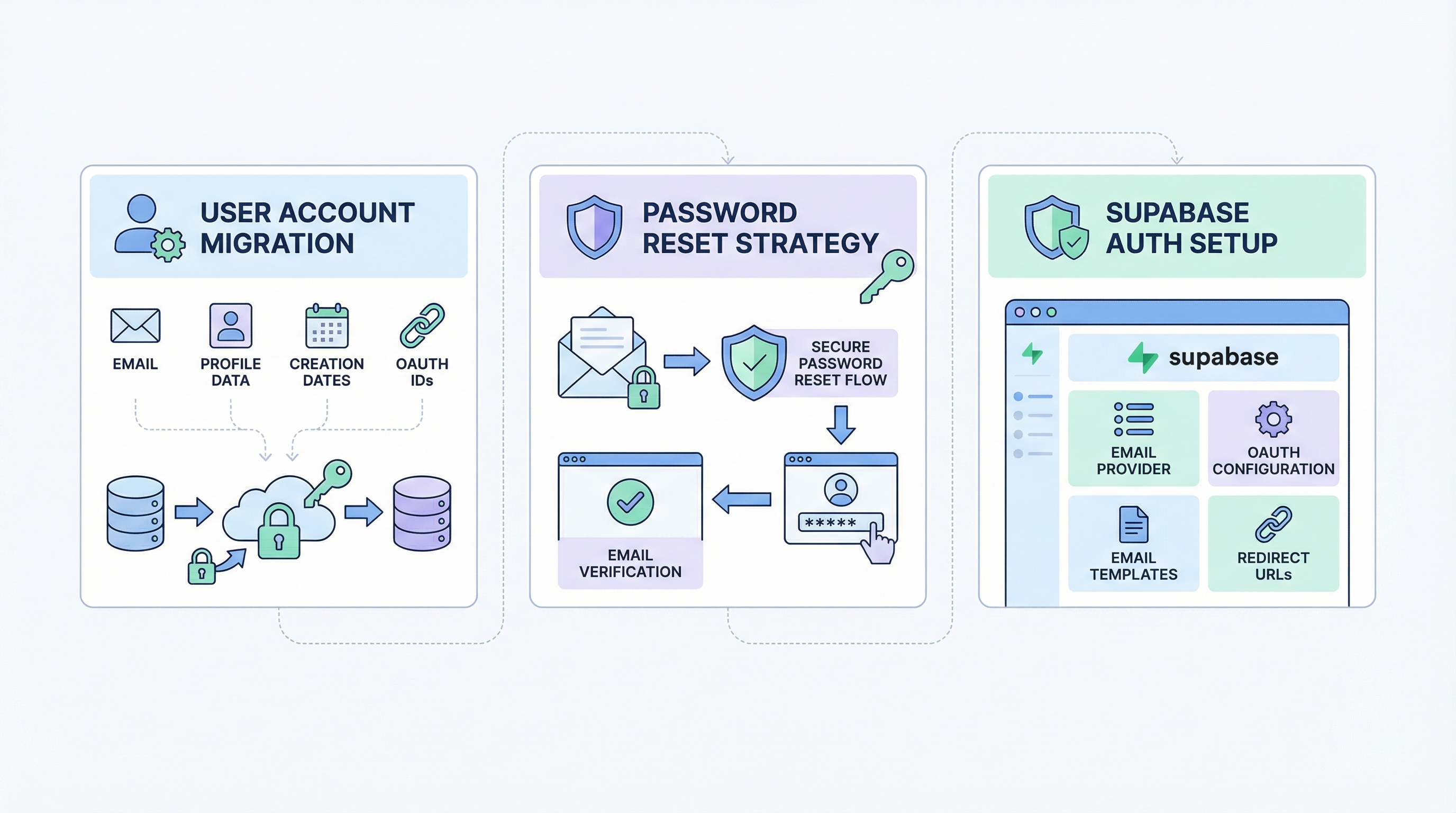
Authentication is the most sensitive part of any migration. Here's how to handle it properly.
User Account Migration
What you can migrate:
- Email addresses
- Profile data (name, avatar, metadata)
- Account creation dates
- External OAuth provider IDs
What you cannot directly migrate:
- Passwords (Bubble uses proprietary hashing)
- Active sessions
The Password Reset Strategy
Since Bubble passwords can't be transferred, the most reliable approach is the transparent password reset:
// In your Next.js API route or auth handler
export async function POST(req) {
  const { email, password } = await req.json();

  const { data: user } = await supabase
    .from('users')
    .select('*')
    .eq('email', email)
    .single();

  if (!user) {
    return Response.json({ error: 'No account found' }, { status: 400 });
  }

  // Check if this is a migrated user who hasn't reset password
  if (user.migrated_from_bubble && !user.password_reset_completed) {
    // Trigger password reset
    await supabase.auth.resetPasswordForEmail(email, {
      redirectTo: `${process.env.NEXT_PUBLIC_URL}/auth/reset-password`
    });

    return Response.json({
      requiresReset: true,
      message: "We've upgraded our security. Check your email to set a new password."
    });
  }

  // Normal sign-in for users who have reset
  const { data, error } = await supabase.auth.signInWithPassword({
    email,
    password
  });

  if (error) {
    return Response.json({ error: error.message }, { status: 400 });
  }

  return Response.json({ user: data.user });
}
Supabase Auth Setup
In your Supabase dashboard:
- Enable email provider — Settings → Authentication → Email
- Configure OAuth (if used) — Add Google, Apple, etc.
- Customize email templates — Auth → Templates
- Set redirect URLs — Include your production domain
// Client-side auth hook (Next.js)
import { createClientComponentClient } from '@supabase/auth-helpers-nextjs';

export function useAuth() {
  const supabase = createClientComponentClient();

  const signIn = async (email, password) => {
    const { data, error } = await supabase.auth.signInWithPassword({
      email,
      password
    });
    return { data, error };
  };

  const signUp = async (email, password, metadata) => {
    const { data, error } = await supabase.auth.signUp({
      email,
      password,
      options: {
        data: metadata // Store name, etc.
      }
    });
    return { data, error };
  };

  const signOut = async () => {
    await supabase.auth.signOut();
  };

  return { signIn, signUp, signOut };
}
Phase 3: File Storage Migration
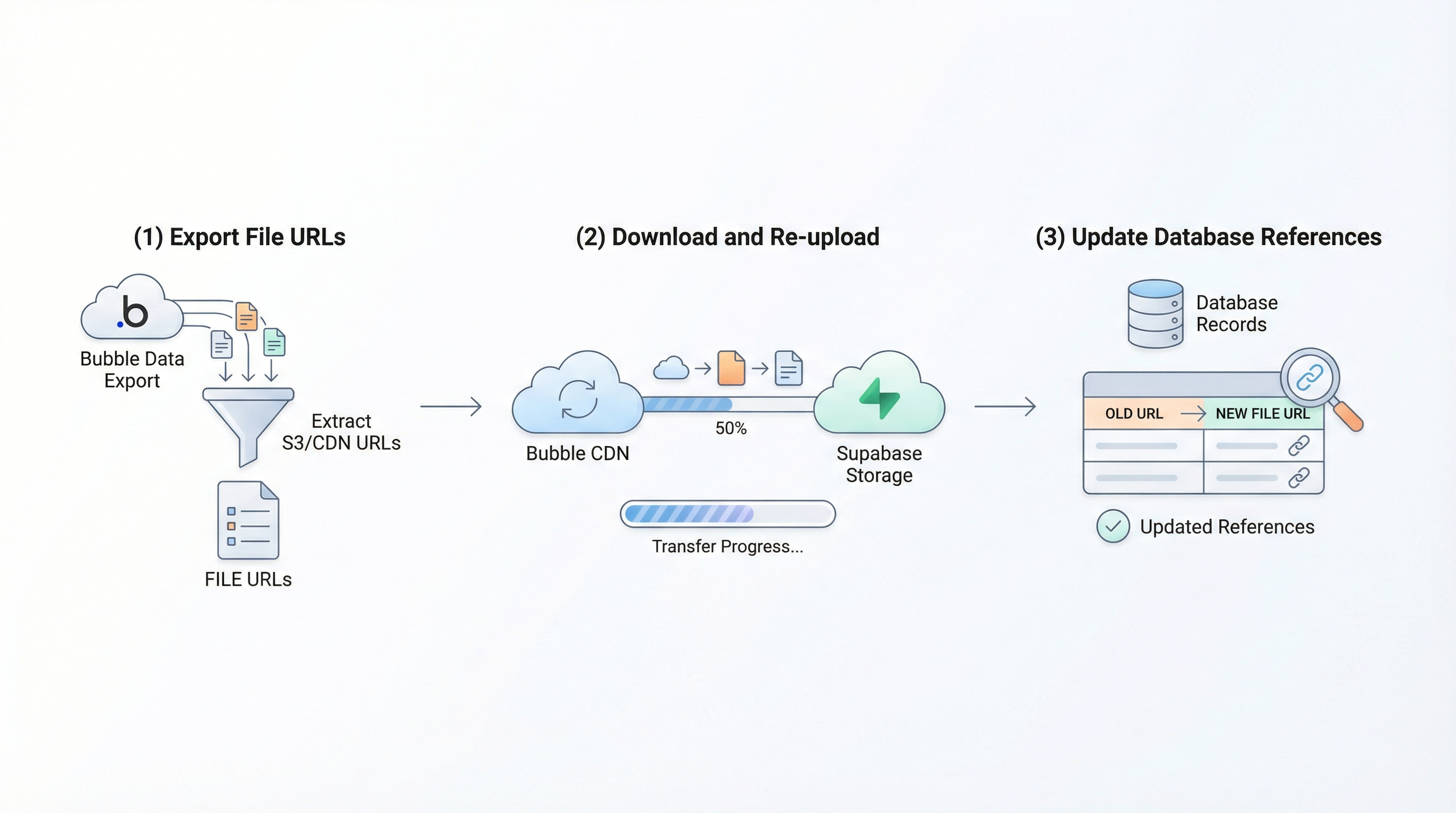
Bubble stores uploaded files on their CDN. You need to download them and re-upload to Supabase Storage.
Step 1: Export File URLs
Your data export includes file URLs like:
https://s3.amazonaws.com/appforest_uf/...
Step 2: Download and Re-upload
import { createClient } from '@supabase/supabase-js';

const supabase = createClient(process.env.SUPABASE_URL, process.env.SUPABASE_KEY);

async function migrateFile(bubbleUrl, newPath) {
  // Download from Bubble CDN
  const response = await fetch(bubbleUrl);
  const blob = await response.blob();

  // Upload to Supabase Storage
  const { data, error } = await supabase.storage
    .from('uploads')
    .upload(newPath, blob, {
      contentType: response.headers.get('content-type'),
      upsert: true
    });

  if (error) {
    throw error;
  }

  // Return new public URL
  const { data: { publicUrl } } = supabase.storage
    .from('uploads')
    .getPublicUrl(newPath);

  return publicUrl;
}

// Usage
const newUrl = await migrateFile(
  'https://s3.amazonaws.com/appforest_uf/old-image.jpg',
  'products/product-123/image.jpg'
);
Step 3: Update Database References
After migrating files, update your database to point to new URLs:
UPDATE products
SET images = ARRAY(
  SELECT replace(url, 'old-cdn-domain', 'your-supabase-project.supabase.co')
  FROM unnest(images) AS url
)
WHERE images IS NOT NULL;
Phase 4: Backend Logic (Workflows → Edge Functions)
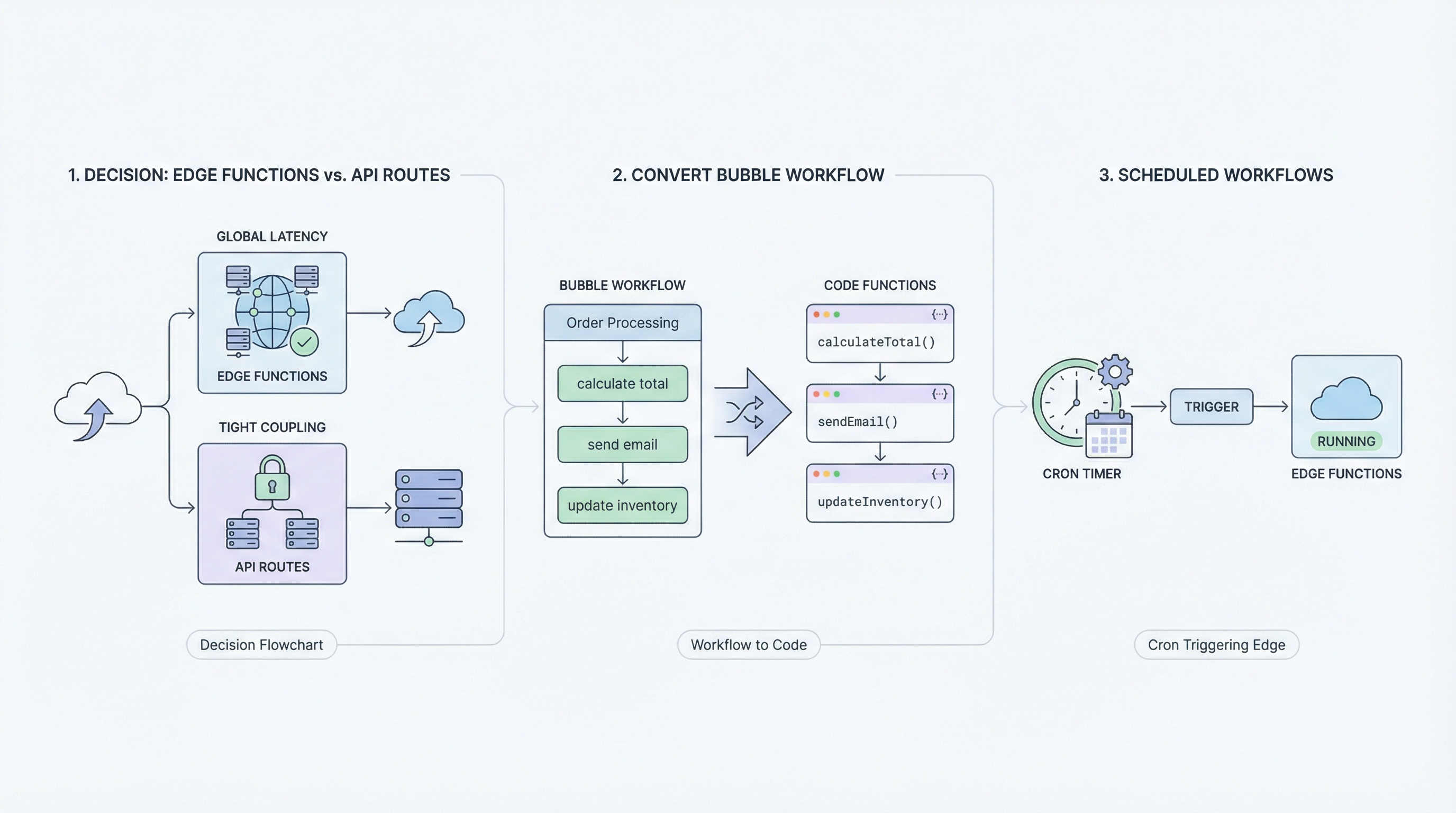
Bubble backend workflows become Supabase Edge Functions or Next.js API routes.
Choosing Between Edge Functions and API Routes
Use Edge Functions when:
- Logic needs to run close to users (low latency globally)
- You want isolated, serverless functions
- The function doesn't need Next.js-specific features
Use Next.js API Routes when:
- Logic is tightly coupled to your frontend
- You need server-side rendering context
- You prefer keeping everything in one codebase
Example: Convert a Bubble Workflow
Bubble workflow: When a new order is created → calculate total → send confirmation email → update inventory
Edge Function equivalent:
// supabase/functions/process-order/index.ts
import { serve } from 'https://deno.land/std@0.168.0/http/server.ts';
import { createClient } from 'https://esm.sh/@supabase/supabase-js@2';

serve(async (req) => {
  const supabase = createClient(
    Deno.env.get('SUPABASE_URL')!,
    Deno.env.get('SUPABASE_SERVICE_ROLE_KEY')!
  );

  const { orderId } = await req.json();

  // Fetch order with items
  const { data: order } = await supabase
    .from('orders')
    .select('*, items:order_items(*)')
    .eq('id', orderId)
    .single();

  // Calculate total
  const total = order.items.reduce((sum, item) =>
    sum + (item.price * item.quantity), 0
  );

  // Update order total
  await supabase
    .from('orders')
    .update({ total })
    .eq('id', orderId);

  // Update inventory
  for (const item of order.items) {
    await supabase.rpc('decrement_inventory', {
      product_id: item.product_id,
      amount: item.quantity
    });
  }

  // Send confirmation (using Resend, SendGrid, etc.)
  await sendOrderConfirmation(order);

  return new Response(JSON.stringify({ success: true }), {
    headers: { 'Content-Type': 'application/json' }
  });
});
Scheduled Workflows
Bubble's scheduled workflows become cron-triggered Edge Functions:
-- In Supabase, use pg_cron extension
SELECT cron.schedule(
  'daily-cleanup',
  '0 0 * * *',  -- Every day at midnight
  $$SELECT net.http_post(
    url := 'https://your-project.supabase.co/functions/v1/daily-cleanup',
    headers := '{"Authorization": "Bearer YOUR_ANON_KEY"}'::jsonb
  )$$
);
Phase 5: Frontend (Bubble Pages → Next.js)
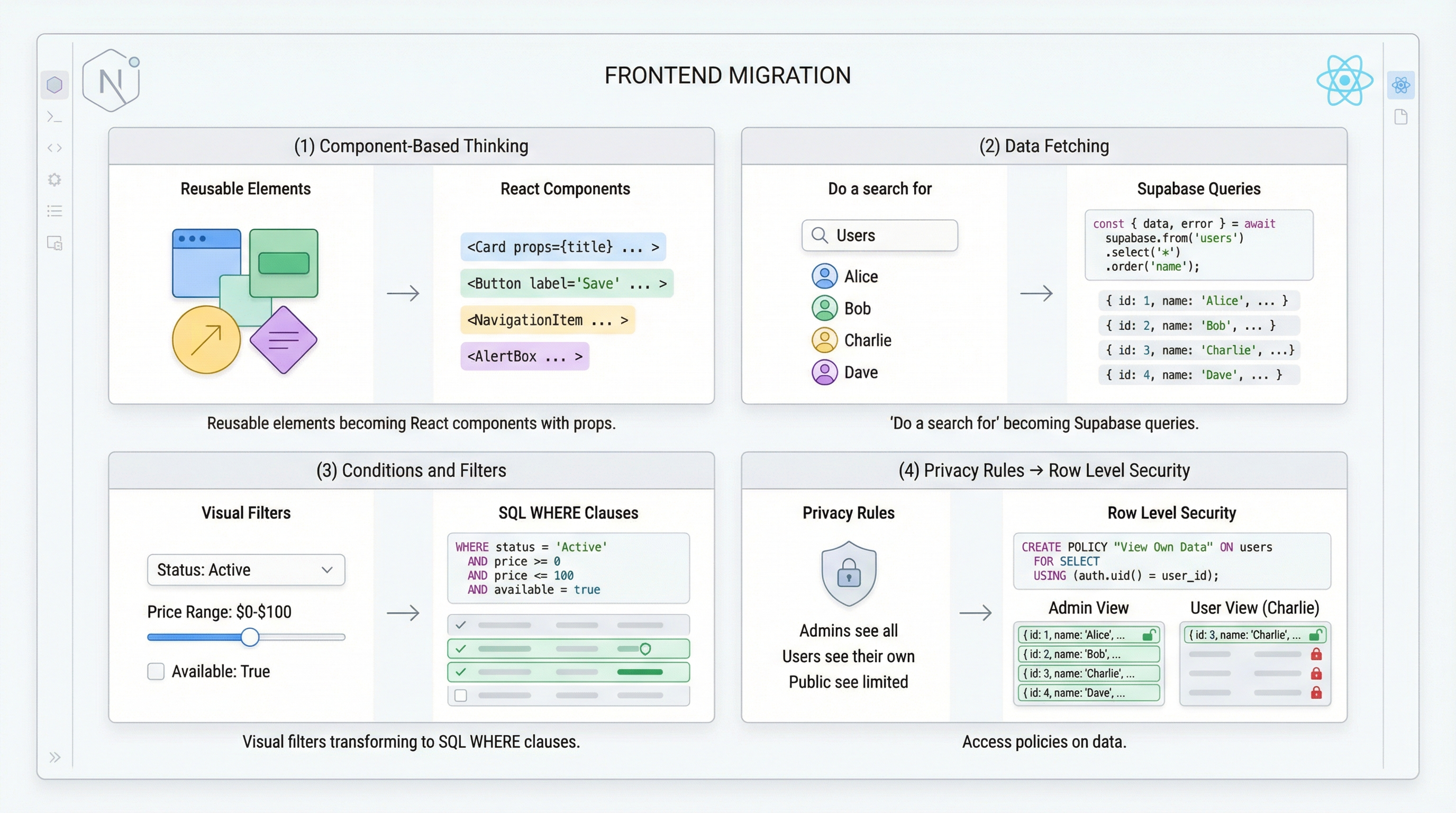
This is where the transformation feels most dramatic. You're moving from visual drag-and-drop to code.
Component-Based Thinking
Bubble's reusable elements are React components. The mental model transfers:
// components/ProductCard.jsx
export function ProductCard({ product }) {
  return (
    <div className="rounded-lg border p-4 shadow-sm">
      <img
        src={product.images[0]}
        alt={product.name}
        className="w-full h-48 object-cover rounded"
      />
      <h3 className="mt-2 font-semibold">{product.name}</h3>
      <p className="text-gray-600">${product.price}</p>
      <span className="text-sm text-gray-500">{product.category}</span>
    </div>
  );
}
Data Fetching
Bubble's "Do a search for" becomes Supabase queries:
// app/products/page.jsx
import { createServerComponentClient } from '@supabase/auth-helpers-nextjs';
import { cookies } from 'next/headers';
import { ProductCard } from '@/components/ProductCard';

export default async function ProductsPage() {
  const supabase = createServerComponentClient({ cookies });

  const { data: products } = await supabase
    .from('products')
    .select('*')
    .order('created_at', { ascending: false })
    .limit(20);

  return (
    <div className="grid grid-cols-1 md:grid-cols-3 gap-6 p-8">
      {products?.map(product => (
        <ProductCard key={product.id} product={product} />
      ))}
    </div>
  );
}
Conditions and Filters
Bubble's "Search for Products where Category is Electronics" becomes:
const { data } = await supabase
  .from('products')
  .select('*')
  .eq('category', 'electronics')  // Where category equals
  .gte('price', 100)              // Where price >= 100
  .order('price', { ascending: true });
Privacy Rules → Row Level Security
Bubble's privacy rules become PostgreSQL RLS policies:
Bubble: "This Product is visible to Current User if Current User is Created By"
Supabase RLS:
-- Enable RLS
ALTER TABLE products ENABLE ROW LEVEL SECURITY;

-- Users can only see their own products
CREATE POLICY "Users see own products" ON products
  FOR SELECT
  USING (auth.uid() = created_by);

-- Users can only update their own products
CREATE POLICY "Users update own products" ON products
  FOR UPDATE
  USING (auth.uid() = created_by);
Phase 6: Deployment
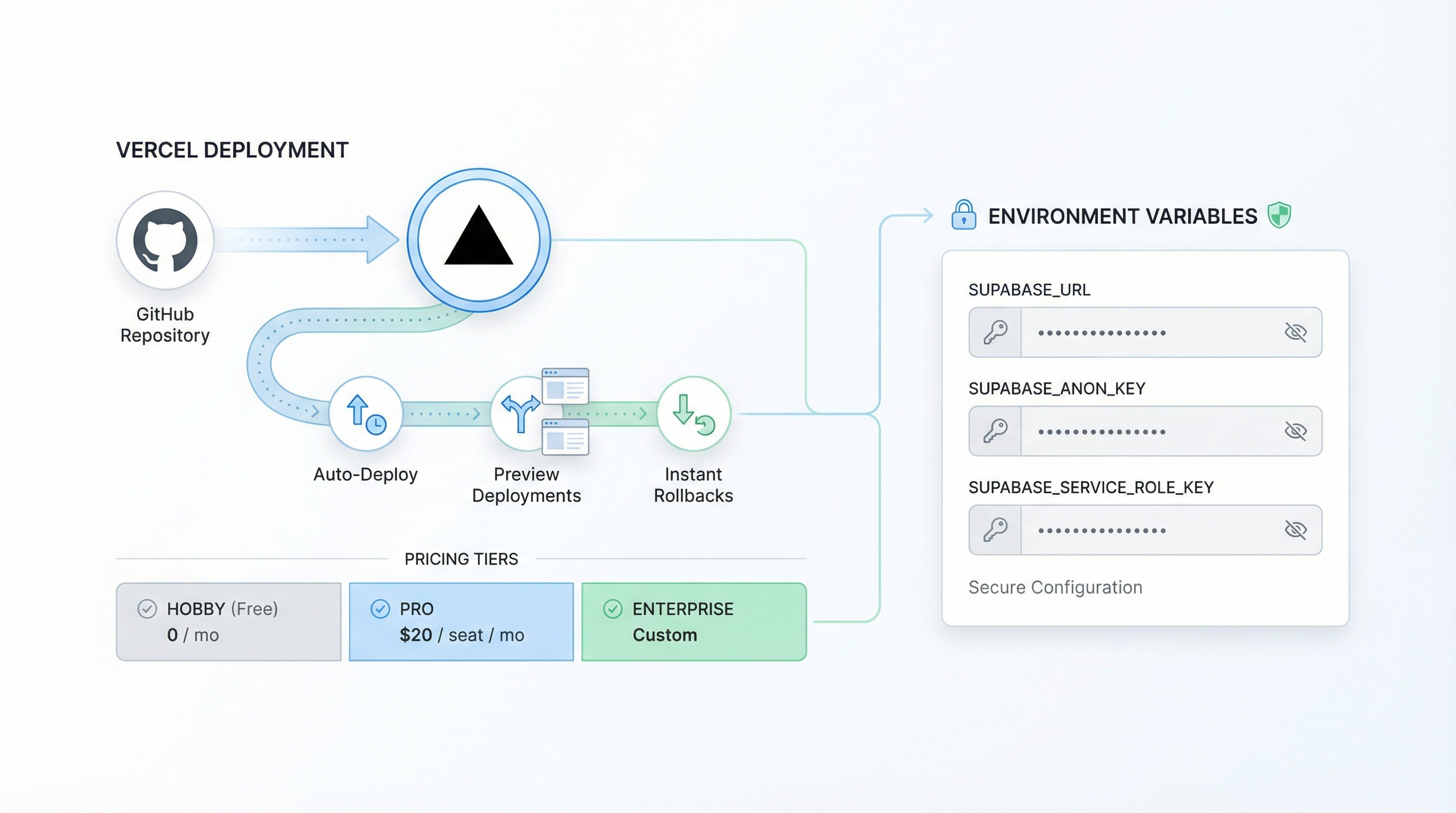
Bubble deployment was one click. With Next.js + Supabase, it's... also one click, just different clicks.
Vercel Deployment (Recommended)
- Push your code to GitHub
- Connect repository to Vercel
- Add environment variables (Supabase URL, keys)
- Deploy
Every push to main auto-deploys. Preview deployments for PRs. Instant rollbacks.
Vercel pricing:
- Hobby (Free): Perfect for most migrated apps
- Pro ($20/month/member): Team features, analytics
- Enterprise: Custom
Environment Variables
NEXT_PUBLIC_SUPABASE_URL=https://your-project.supabase.co
NEXT_PUBLIC_SUPABASE_ANON_KEY=your-anon-key
SUPABASE_SERVICE_ROLE_KEY=your-service-key  # Server-side only
Post-Migration Checklist
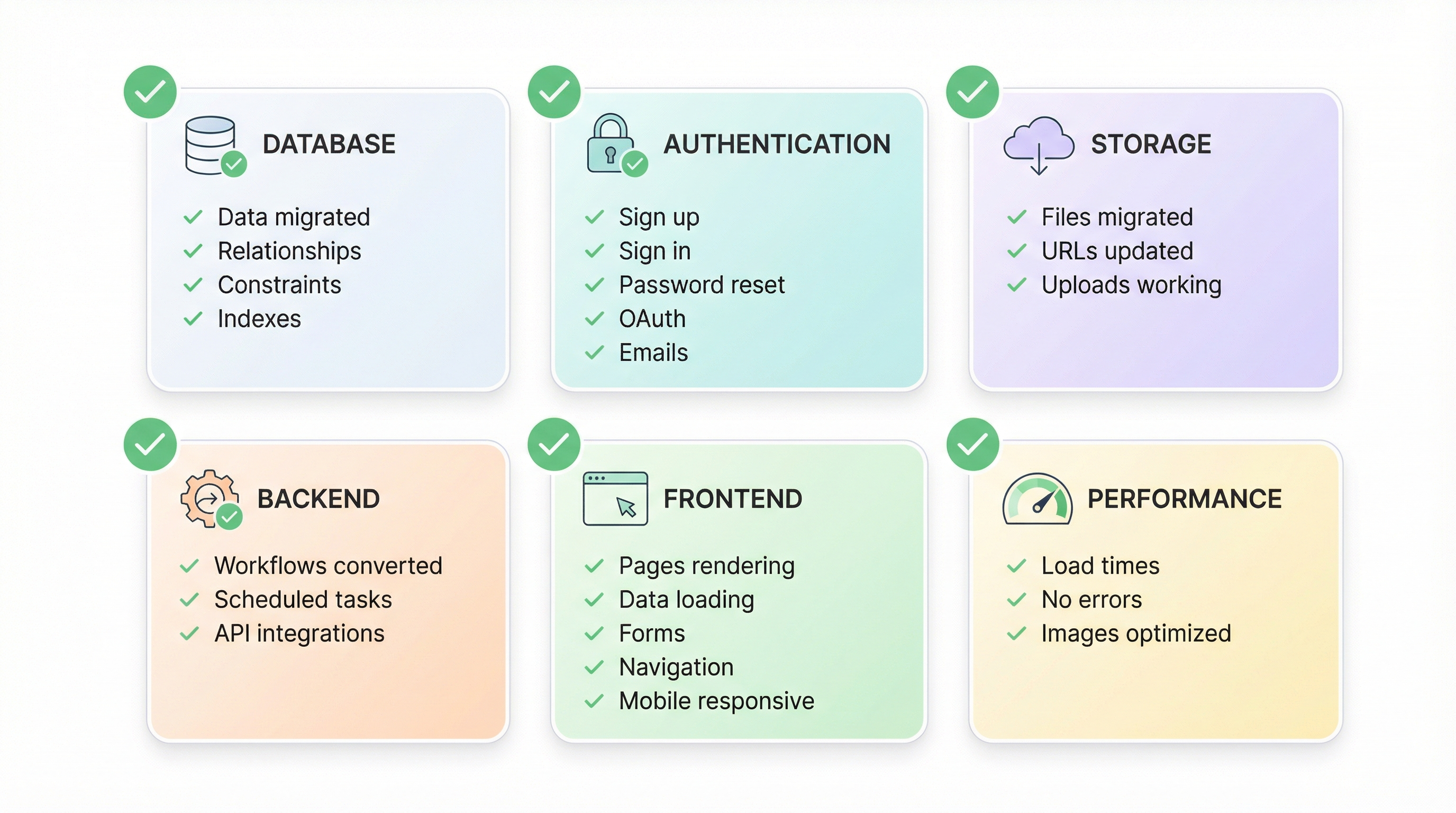
Before you flip the switch, verify everything:
Database:
- All data types migrated
- Relationships preserved
- Unique constraints working
- Indexes created for common queries
Authentication:
- Sign up flow works
- Sign in flow works
- Password reset works
- OAuth providers connected (if used)
- Email templates customized
Storage:
- All files migrated
- Old URLs redirecting or replaced
- Upload functionality working
Backend:
- All workflows converted
- Scheduled tasks running
- API integrations working
Frontend:
- All pages rendering
- Data loading correctly
- Forms submitting
- Navigation working
- Mobile responsive
Performance:
- Page load times acceptable
- No console errors
- Images optimized
Realistic Timeline
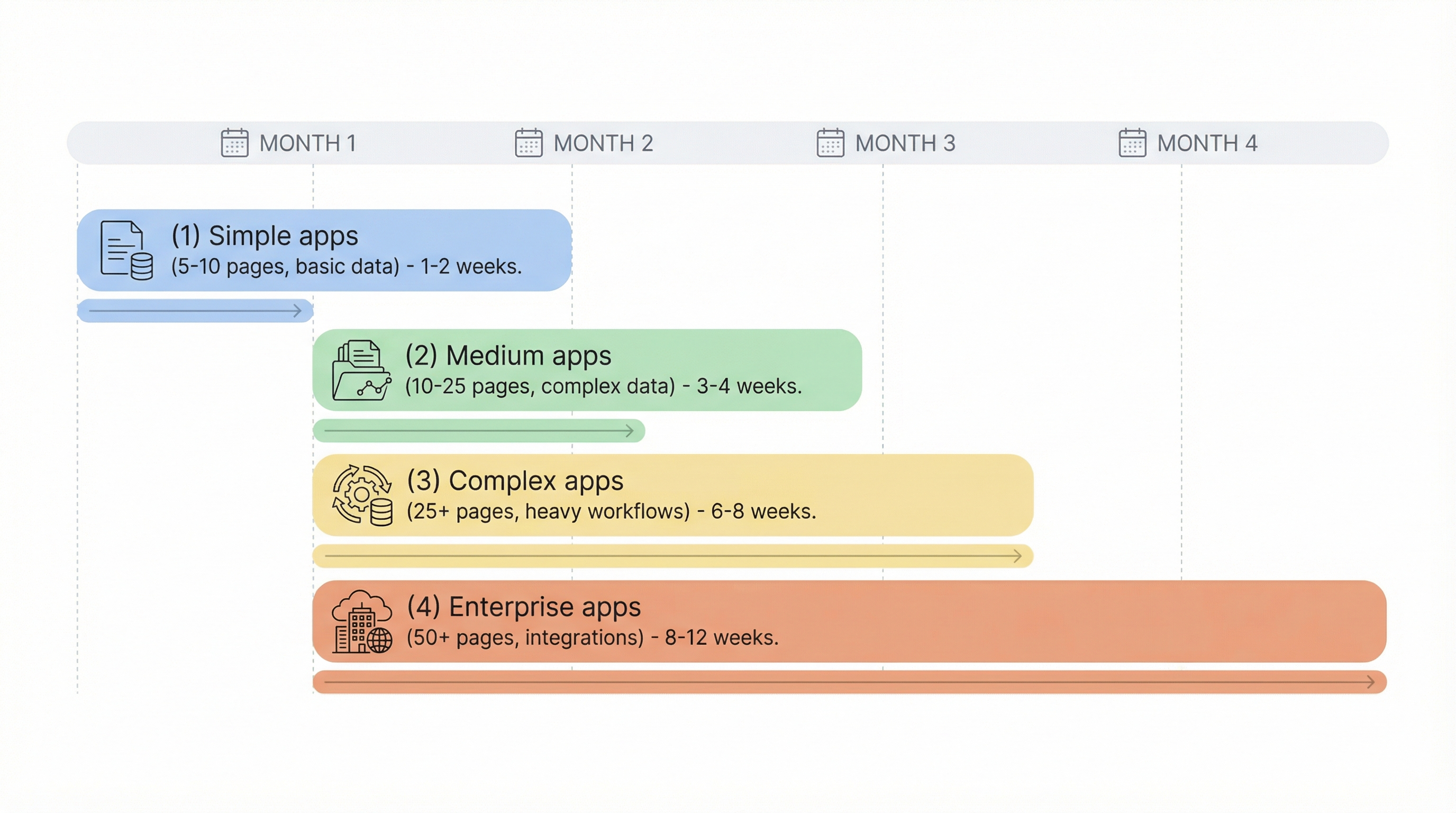
| App Complexity | Migration Duration |
|---|---|
| Simple (5-10 pages, basic data) | 1-2 weeks |
| Medium (10-25 pages, complex data) | 3-4 weeks |
| Complex (25+ pages, heavy workflows) | 6-8 weeks |
| Enterprise (50+ pages, integrations) | 8-12 weeks |
These assume dedicated focus. Side-project migrations take 2-3x longer.
The Cost Difference (Real Numbers)
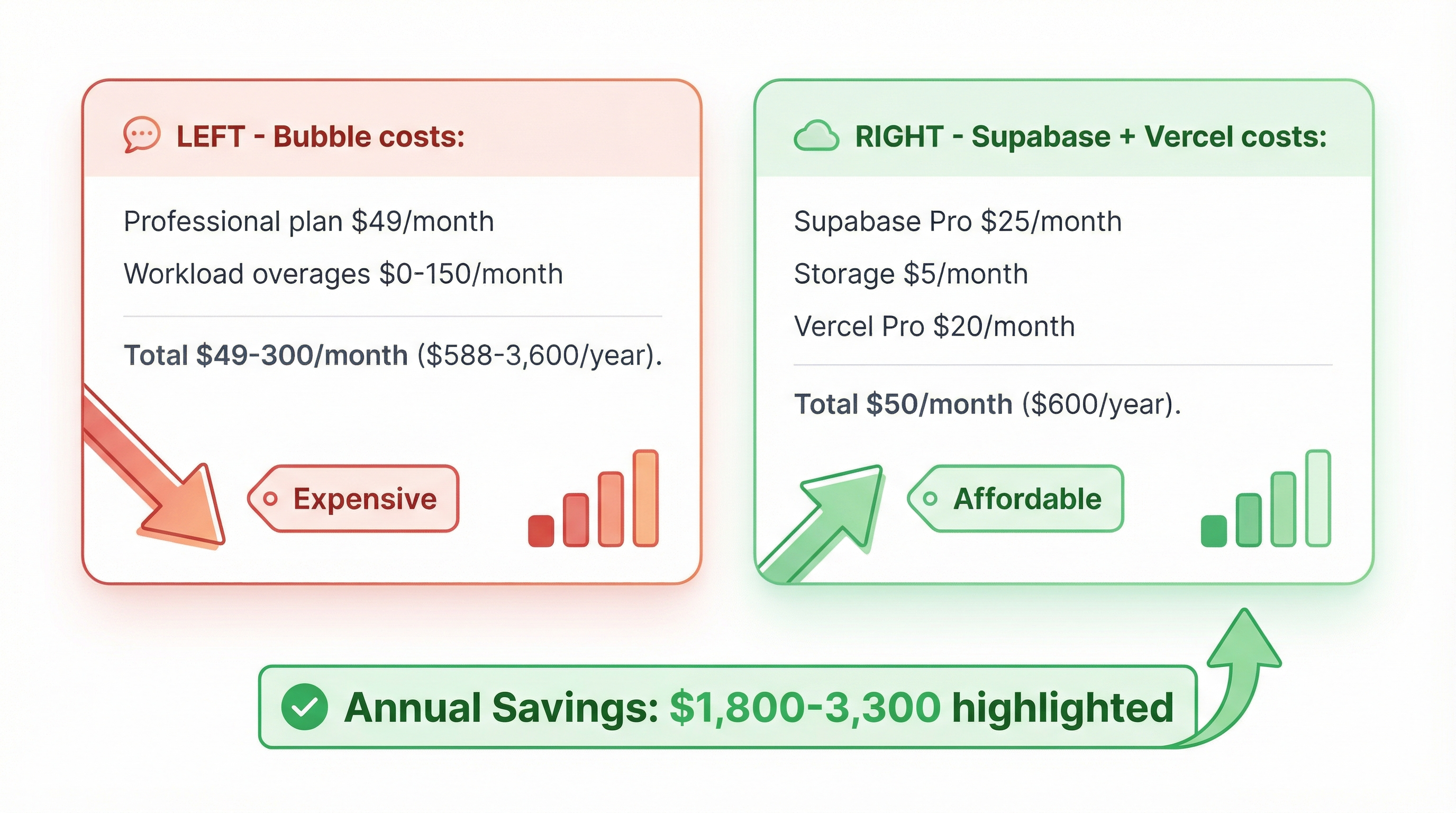
Let's make this concrete:
Scenario: 5,000 monthly active users, 2 GB database, 10 GB file storage
Bubble costs:
- Professional plan: $149/month
- Workload overages (typical): $50-150/month
- Total: $200-300/month ($2,400-3,600/year)
Supabase + Vercel costs:
- Supabase Pro: $25/month
- Additional storage: ~$5/month
- Vercel Pro (optional): $20/month
- Total: $25-50/month ($300-600/year)
Annual savings: $1,800-3,300
A one-time migration investment of $2,500-5,000 pays for itself in 12-18 months. After that, you're saving thousands annually—forever.
Frequently Asked Questions
How long does it take to learn Supabase coming from Bubble?
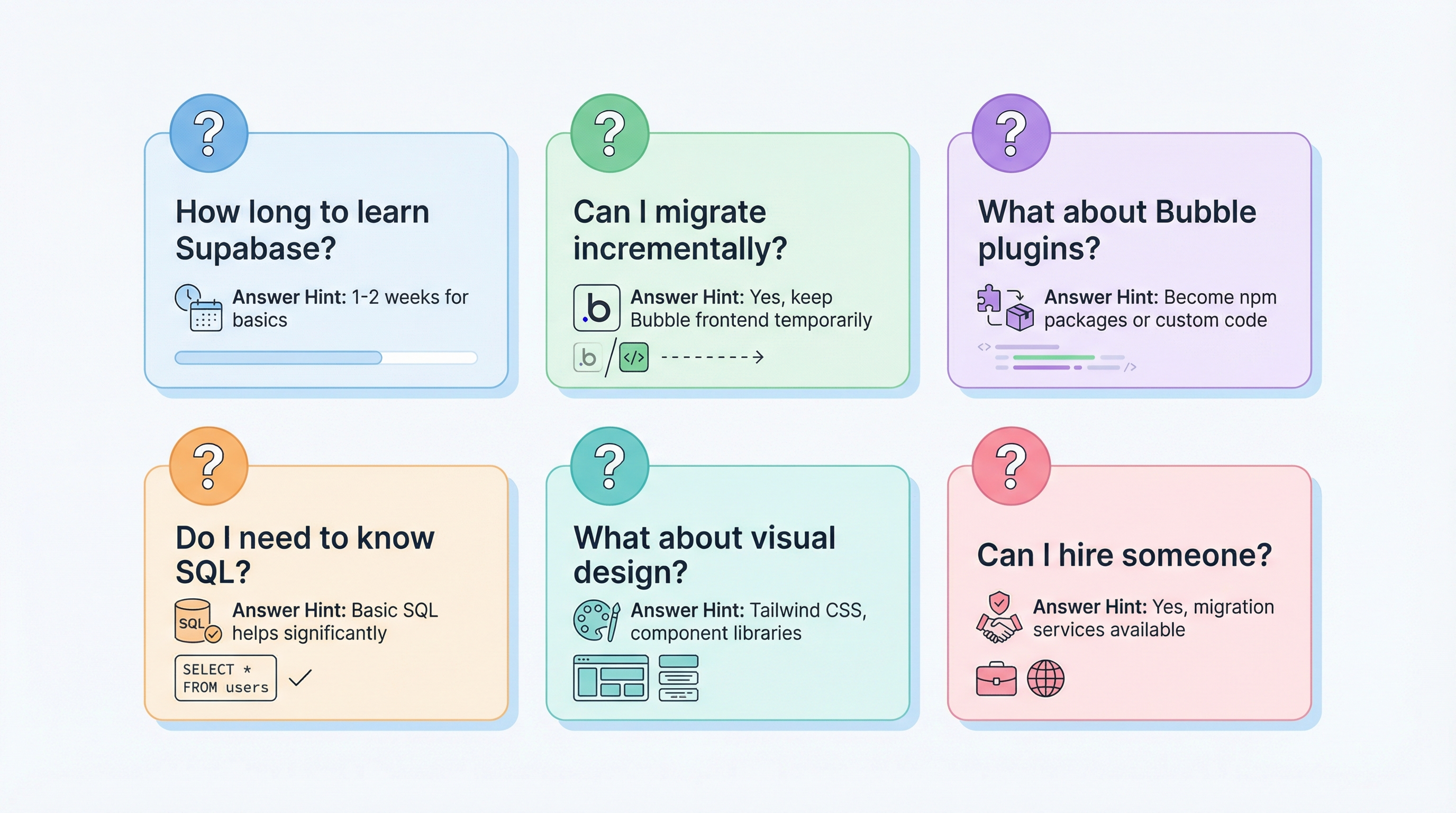
Most Bubble founders become comfortable with Supabase basics within 1-2 weeks. The dashboard is intuitive, documentation is excellent, and concepts translate. The steeper learning curve is JavaScript/React for the frontend—budget 1-3 months to become proficient if you're starting from zero.
Can I migrate incrementally instead of all at once?
Yes. A common approach: keep Bubble for the frontend temporarily while migrating backend to Supabase. Use Bubble's API Connector to talk to your Supabase database. This lets you validate the data migration before rebuilding the UI.
What happens to my Bubble plugins?
Plugins become npm packages or custom code. Most common plugin functionality has standard JavaScript equivalents. However, highly Bubble-specific plugins may need custom implementation. Audit your plugin dependencies before migrating.
Do I need to know SQL?
Basic SQL helps significantly. You'll want to understand SELECT, INSERT, UPDATE, DELETE, and JOIN. Supabase's dashboard provides a visual query builder, but SQL knowledge unlocks advanced capabilities. Budget a few hours on SQLBolt or similar tutorials.
What about Bubble's visual design capabilities?
This is the biggest adjustment. You'll use Tailwind CSS, a component library like shadcn/ui, or a drag-and-drop React builder. The design freedom is actually greater—but the learning curve is real if you've never written CSS.
Can I hire someone to do this for me?
Yes. Migration services (like ours) handle the technical complexity while you focus on your business. The typical process: we export your data, rebuild your app in code, migrate your users, and hand you the keys. You end up with code you own, running on infrastructure you control.
The Path Forward
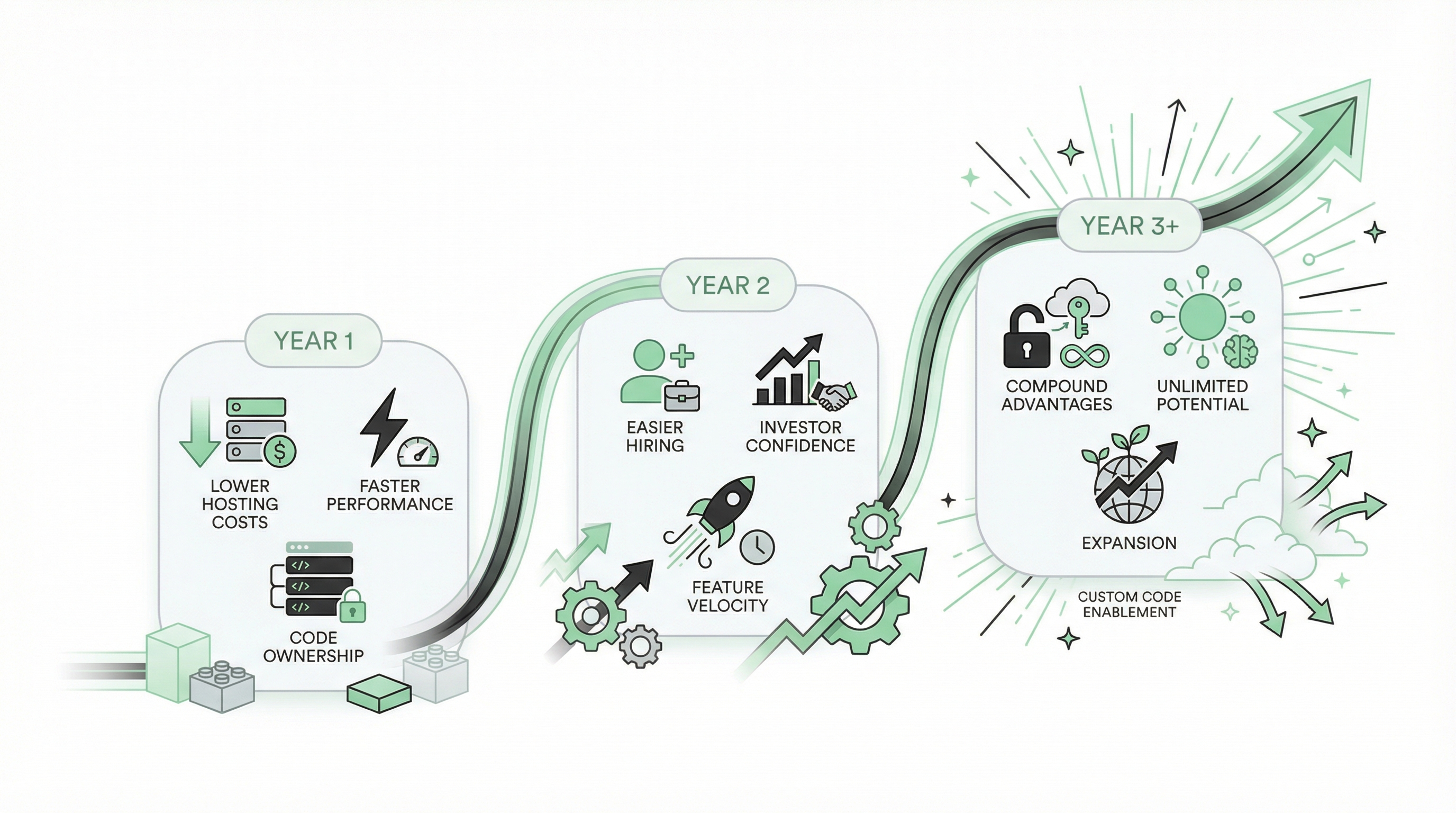
Migrating from Bubble to Supabase + Next.js isn't just a technical project. It's a business decision with compound returns:
Year 1: Lower hosting costs, faster performance, code ownership Year 2: Easier hiring, investor confidence, feature velocity Year 3+: Compound advantages as custom code enables what no-code couldn't
"I never thought of going back to bubble" — munaeemmmm
That's not lock-in speaking. That's liberation.
The possibilities aren't just endless—they're yours.
Ready to migrate? Get a free migration assessment → We'll review your Bubble app, estimate the migration scope, and give you a realistic timeline and cost. If it doesn't make sense yet, we'll tell you.
Related reading:
Ready to talk migration?
Get a free assessment of your Bubble app. We'll tell you exactly what to expect — timeline, cost, and any potential challenges.