
How to Migrate from Bubble to Next.js in 2026 (Step-by-Step Guide)

Three weeks.
That's how long it took a bootstrapped SaaS founder to migrate their entire Bubble app to Next.js + Supabase. Three weeks from "I need to get off Bubble" to "We're live on production code."
Not three months. Not six months. Three weeks.
"We migrated from Bubble to Next.js in one weekend. Performance improved 3x and our hosting bill dropped from $350/mo to $20/mo." — Founder, SaaS startup, Jan 2026
Read that again. Performance tripled. Costs dropped 94%. Done in a weekend.
This isn't a story about how hard migration is. It's a story about how AI code generation made migration trivial—and why the biggest migration risk in 2026 is waiting too long to start.
If you're reading this, you've already made the decision. The workload unit bills, the 8-second load times, the investor questions about "What's your migration plan?"—you've seen enough. You're ready to leave Bubble.
This guide is the most comprehensive migration resource available. We'll cover every layer: data export, code generation with AI, database setup, authentication, file storage, deployment, and zero-downtime user migration.
By the end, you'll know exactly how to migrate—and whether you can do it yourself or need help.
Why Next.js + Supabase? (The Stack Bubble Users Actually Understand)
Before diving into the how, let's address the why. What makes Next.js + Supabase the go-to stack for Bubble refugees?
Supabase: What Bubble's Backend Should Have Been
Supabase bills itself as "the open-source Firebase alternative," but for Bubble users, a better description is: "Bubble's backend, but you own it."
What Supabase gives you:
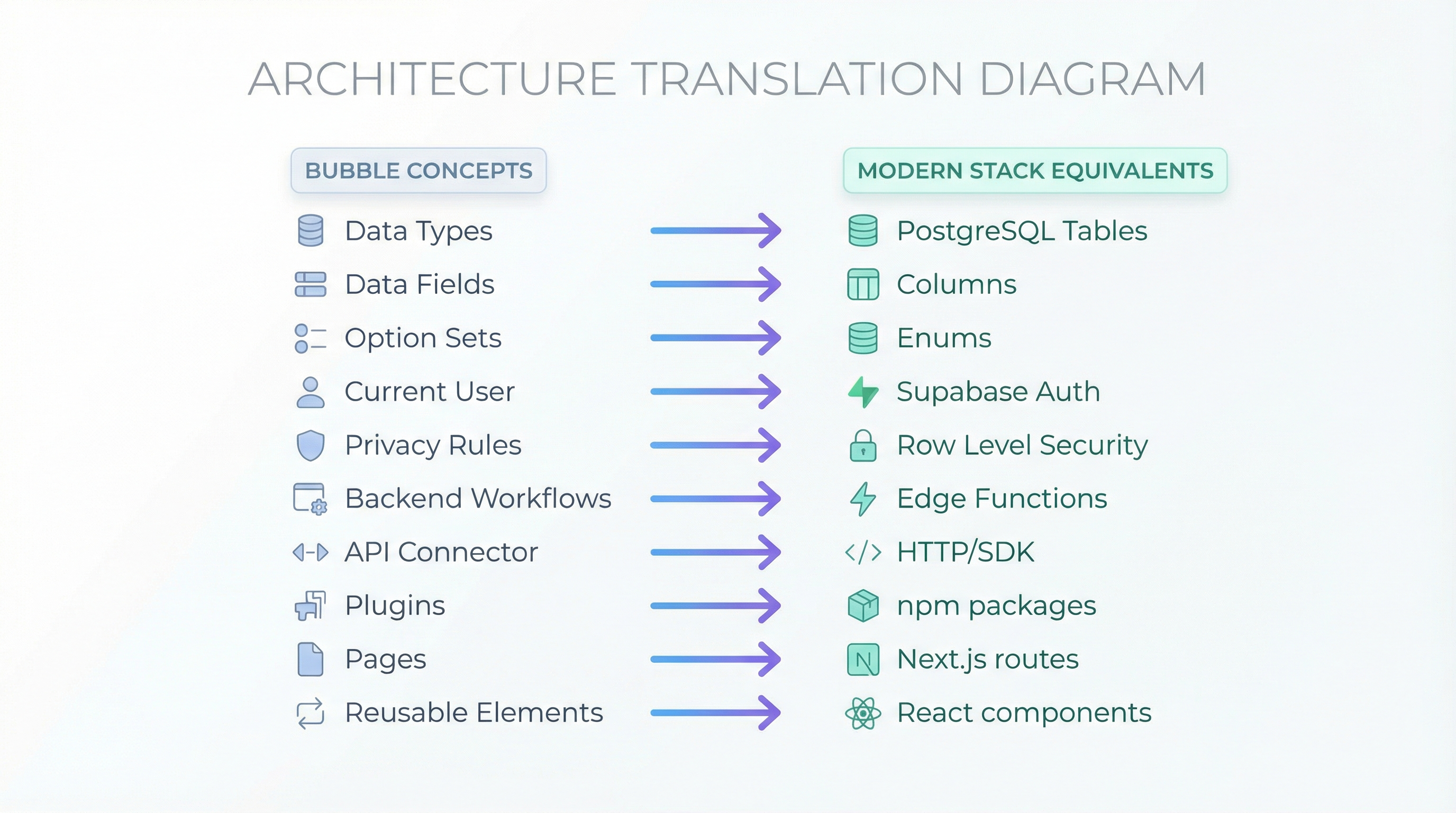
| Bubble Feature | Supabase Equivalent | Why It's Better |
|---|---|---|
| Data Types | PostgreSQL tables | Industry-standard SQL, unlimited scale |
| Privacy Rules | Row-Level Security (RLS) | More powerful, database-enforced |
| Backend Workflows | Edge Functions | Faster, runs at network edge |
| File Uploads | Storage with CDN | Proper CDN, image optimization |
| User Auth | Built-in Auth | Email, OAuth, magic links, phone |
| API Connector | Direct database access | No connector needed, SQL queries |
| Real-time Data | Real-time subscriptions | Live updates without polling |
The learning curve from Bubble to Supabase is gentler than you'd expect. You're still thinking in terms of users, data types, and access rules—just with better tools.
Pricing reality check:
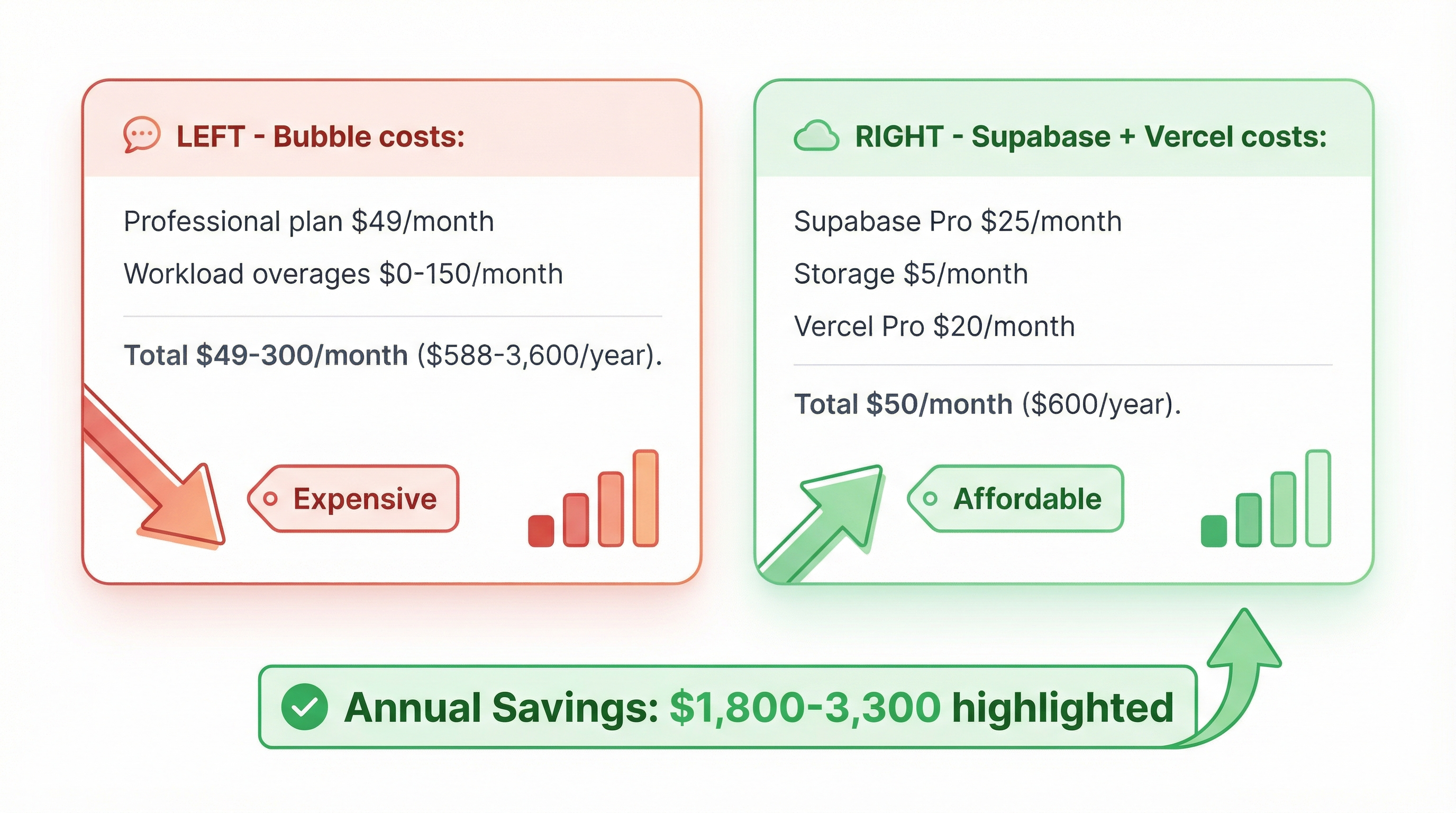
| Usage Level | Bubble Cost | Supabase Cost | Savings |
|---|---|---|---|
| Free tier | 50 users, Bubble branding | 500MB DB, 50K MAU, no branding | $29/mo saved |
| Small app (1K users) | $29/mo minimum | $0 (free tier) | $348/year saved |
| Growing (10K users) | $119-349/mo | $25/mo | $1,128-3,888/year saved |
| Scaling (50K+ users) | $349+ + overages | $25-50/mo | $3,588-14,388/year saved |
"We have moved out completely from bubble using supabase and next js. possibilities are endless" — munaeemmmm, Bubble Forum
Next.js: The Framework Bubble Prepared You For
Next.js is a React framework that makes web development simple. For Bubble users, the mental model translates:
| Bubble Concept | Next.js Equivalent |
|---|---|
| Pages | Files in /pages or /app folder |
| Reusable Elements | React components |
| Custom States | useState hook |
| Workflows | API routes or server actions |
| Conditions | JavaScript if/else or ternaries |
| Repeating Groups | .map() over arrays |
| URL Parameters | Next.js router params |
| Current User | Supabase useUser() hook |
What makes Next.js perfect for Bubble migrants:
- ✅ No server config — Vercel deployment is as simple as Bubble's "deploy to live"
- ✅ Visual thinking applies — Components are like reusable elements
- ✅ Performance by default — Server-side rendering, automatic code splitting
- ✅ Huge community — Stack Overflow, Discord, tutorials everywhere
- ✅ Hiring-friendly — Millions of developers know React/Next.js
"I never thought of going back to bubble" — munaeemmmm, months after migration
Step 1: Audit Your Bubble App (Pre-Migration Checklist)
Before exporting anything, document everything your app does. This inventory becomes your AI prompt.
Create Your App Inventory
Use this template:
# My Bubble App Inventory

## Pages & Access Levels
- Homepage (public)
- Login/Signup (public)
- Dashboard (requires auth)
- Settings (requires auth, profile editing)
- Admin Panel (requires auth, role: admin)
- Billing (requires auth, Stripe integration)

## Data Types & Fields

### User
- email (text, unique)
- name (text)
- created_at (date)
- subscription_tier (option set: free, pro, enterprise)
- stripe_customer_id (text)
- profile_photo (image)

### Post
- title (text)
- content (text, long)
- author (User reference)
- published_at (date)
- status (option set: draft, published, archived)
- view_count (number)

### Comment
- post (Post reference)
- author (User reference)
- text (text)
- created_at (date)
- is_flagged (yes/no)

## Key Workflows

### User Signup
1. User creates account
2. Send welcome email (SendGrid)
3. Create Stripe customer record
4. Redirect to onboarding

### Post Publishing
1. User clicks "Publish"
2. Set status = published
3. Set published_at = current date/time
4. Send notification to followers
5. Post to Twitter (API connector)

### Comment Moderation
1. Admin flags comment
2. Set is_flagged = yes
3. Send email to comment author
4. Hide from public view

## Privacy Rules

### User
- Only current user can see their own email
- Profile photo is public
- Created_at is public

### Post
- Published posts are public
- Draft posts only visible to author
- Archived posts only visible to admins

### Comment
- Public if not flagged
- Flagged comments only visible to admins

## Integrations & APIs

- **Stripe**: Payments, subscription management
- **SendGrid**: Transactional emails
- **Cloudinary**: Image uploads and transformation
- **Twitter API**: Auto-posting
- **Google Analytics**: Tracking

## Scheduled Workflows

- Daily digest email (9 AM daily)
- Monthly invoice generation (1st of month)
- Cleanup old sessions (weekly)

## Option Sets

- Subscription Tier: free, pro, enterprise
- Post Status: draft, published, archived
- User Role: user, admin, moderator
Why this matters: This becomes your prompt to Lovable/AI tools. The more detailed you are, the better the generated code.
Identify Your Bubble Plugins
List every plugin you're using and find its replacement:
| Bubble Plugin | Code Equivalent |
|---|---|
| Stripe Checkout | @stripe/stripe-js npm package |
| SendGrid | @sendgrid/mail npm package |
| Google Maps | Google Maps JavaScript API |
| Chart.js | chart.js or recharts |
| Rich Text Editor | react-quill or tiptap |
| PDF Generator | pdfmake or react-pdf |
| Image Cropper | react-easy-crop |
| Calendar | react-big-calendar |
For custom plugins: You'll need to replicate the functionality in code. Budget extra time for this.
Step 2: Export Your Bubble Data

Bubble lets you export your database as CSV or JSON. Here's how to do it properly:
Exporting Data Types
- Log into Bubble → Open your app
- Go to Data tab → Click "App Data"
- Select a data type (e.g., "User")
- Click "Export as CSV" → Save as
users.csv - Repeat for each data type
Pro tip: Export in this order to preserve relationships:
- Users (no dependencies)
- Posts (depends on Users)
- Comments (depends on Posts and Users)
Handling File Uploads
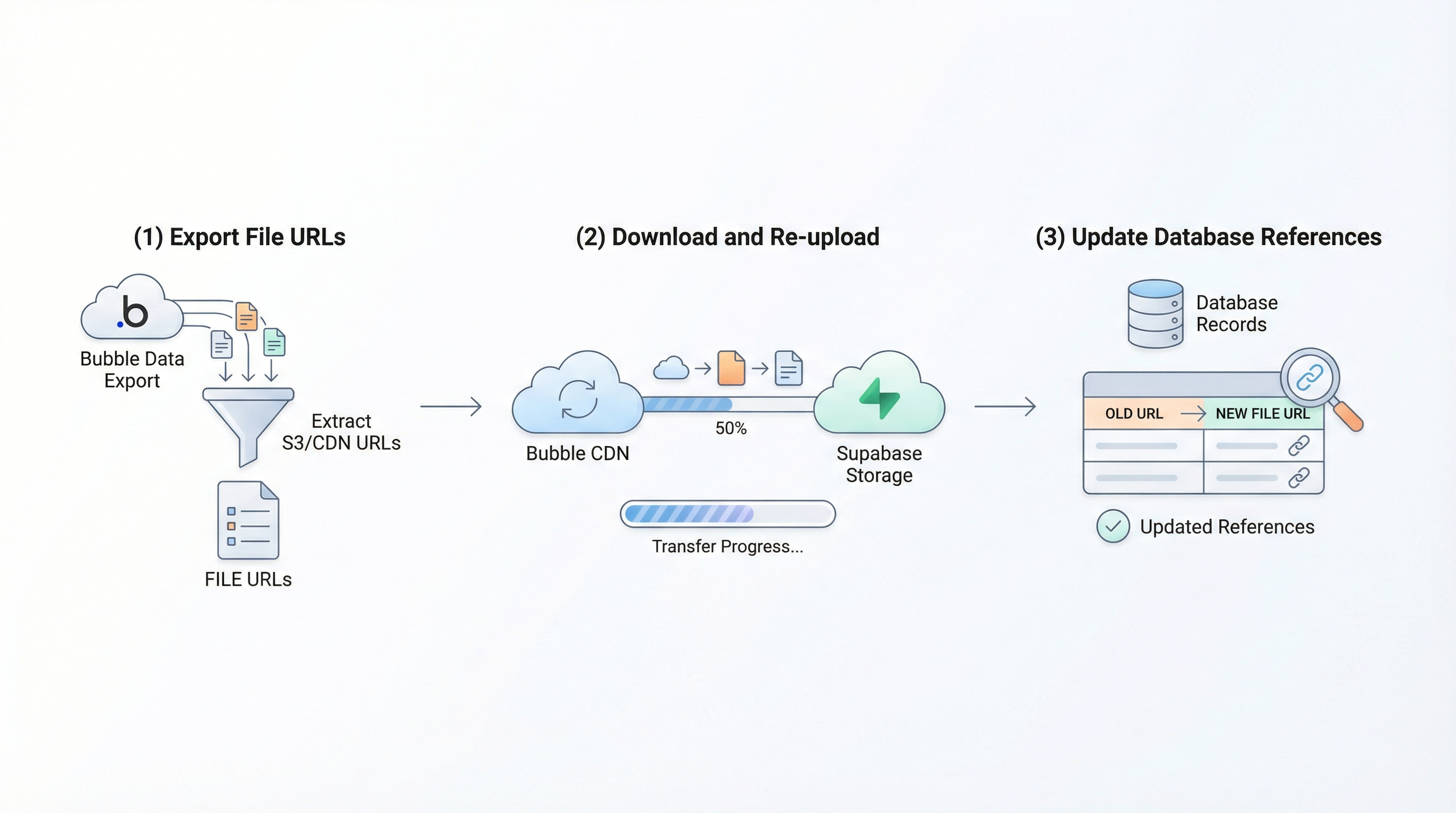
Critical: Bubble file URLs expire after 30-90 days. You must download and re-upload them.
Process:
- Export your data type with file fields
- Extract all file URLs from the CSV
- Download files to local storage:
# Create download script
cat > download_files.sh << 'EOF'
#!/bin/bash
while IFS=, read -r id url filename
do
    curl -o "./files/$id-$filename" "$url"
done < file_urls.csv
EOF

chmod +x download_files.sh
./download_files.sh
- Upload to Cloudinary or Supabase Storage:
# Upload to Supabase Storage (example)
npx supabase-js storage upload \
  --bucket avatars \
  --file ./files/*.jpg
Export File Structure
bubble-export/
├── users.csv
├── posts.csv
├── comments.csv
├── subscriptions.csv
├── files/
│   ├── user-123-avatar.jpg
│   ├── user-456-avatar.png
│   └── post-789-cover.jpg
└── workflows/
    └── scheduled-workflows.md
Checkpoint: You should have all your data backed up locally before proceeding.
Step 3: Generate Your Next.js App with AI

This is where magic happens. Instead of manually rebuilding your app line by line, you describe it to AI and get a working codebase in minutes.
Option A: Lovable (Recommended for Most Users)
Lovable.dev generates full-stack Next.js apps from plain English.
Step-by-step:
- Sign up at lovable.dev (free tier available)
- Create new project → Select "Next.js + Supabase"
- Paste your app inventory (from Step 1)
- Add specific requirements:
Build a SaaS app that replicates my Bubble app.

AUTHENTICATION:
- Email + password signup/login
- Google OAuth
- Password reset via email
- Email verification

DATABASE (Supabase):
- Users table: email, name, created_at, subscription_tier, stripe_customer_id
- Posts table: title, content, author_id, published_at, status, view_count
- Comments table: post_id, author_id, text, created_at, is_flagged

PAGES:
- Homepage (public)
- Login/Signup (public)
- Dashboard (protected, shows user's posts)
- Post detail page (public for published, private for drafts)
- Settings (protected, profile editing)
- Admin panel (protected, role-based)

KEY FEATURES:
- Create/edit/delete posts
- Publish/unpublish posts
- Comment on posts
- Admin can flag comments
- Stripe subscription integration
- SendGrid email integration

ROW-LEVEL SECURITY:
- Users can only edit their own posts
- Only admins can flag comments
- Draft posts only visible to author
- Generate → Lovable creates your codebase in 3-5 minutes
- Download or connect to GitHub
What you get:
- Complete Next.js app with TypeScript
- Supabase database schema (SQL)
- Authentication flows
- All CRUD operations
- Row-level security policies
- API routes for workflows
- Responsive UI components
Option B: Replit Agent (Best for Beginners)
Replit Agent builds AND hosts your app in one place.
- Go to replit.com → Create account
- Create new Repl → Enable "Agent mode"
- Describe your app (use your inventory from Step 1)
- Replit generates code + hosts it instantly
Pros:
- Instant hosting (no separate deployment)
- Built-in database
- One-click setup
Cons:
- Less control over infrastructure
- Slower performance than Vercel Edge
- Eventual migration if you outgrow Replit
Option C: v0 + Manual Assembly (For UI Perfection)
v0.dev generates beautiful UI components, but you assemble the app.
- Design each page in Figma (optional but helpful)
- Go to v0.dev → Describe each page/component
- Generate React components
- Manually create Next.js app and import components
- Add Supabase backend yourself
Best for: Designers who want pixel-perfect UI and don't mind more assembly work.
Step 4: Set Up Supabase Database
Now you recreate your Bubble database schema in Supabase.
Create Supabase Project
- Sign up at supabase.com
- Create new project → Name it, set password
- Wait 2-3 minutes for provisioning
Recreate Database Schema
Using your Bubble data types, create tables in Supabase.
Example: Users Table
-- Create users table (extends Supabase auth.users)
CREATE TABLE public.users (
  id UUID PRIMARY KEY REFERENCES auth.users(id) ON DELETE CASCADE,
  email TEXT UNIQUE NOT NULL,
  name TEXT,
  created_at TIMESTAMP DEFAULT NOW(),
  subscription_tier TEXT DEFAULT 'free' CHECK (subscription_tier IN ('free', 'pro', 'enterprise')),
  stripe_customer_id TEXT,
  profile_photo_url TEXT
);

-- Enable Row Level Security
ALTER TABLE public.users ENABLE ROW LEVEL SECURITY;

-- Users can view their own data
CREATE POLICY "Users can view own data"
  ON public.users
  FOR SELECT
  USING (auth.uid() = id);

-- Users can update their own data
CREATE POLICY "Users can update own data"
  ON public.users
  FOR UPDATE
  USING (auth.uid() = id);
Example: Posts Table
CREATE TABLE public.posts (
  id UUID PRIMARY KEY DEFAULT gen_random_uuid(),
  title TEXT NOT NULL,
  content TEXT,
  author_id UUID REFERENCES public.users(id) ON DELETE CASCADE,
  published_at TIMESTAMP,
  status TEXT DEFAULT 'draft' CHECK (status IN ('draft', 'published', 'archived')),
  view_count INTEGER DEFAULT 0,
  created_at TIMESTAMP DEFAULT NOW()
);

ALTER TABLE public.posts ENABLE ROW LEVEL SECURITY;

-- Published posts are public
CREATE POLICY "Published posts are public"
  ON public.posts
  FOR SELECT
  USING (status = 'published');

-- Authors can view their own posts
CREATE POLICY "Authors can view own posts"
  ON public.posts
  FOR SELECT
  USING (auth.uid() = author_id);

-- Authors can update their own posts
CREATE POLICY "Authors can update own posts"
  ON public.posts
  FOR UPDATE
  USING (auth.uid() = author_id);

-- Authors can delete their own posts
CREATE POLICY "Authors can delete own posts"
  ON public.posts
  FOR DELETE
  USING (auth.uid() = author_id);
Supabase UI method (no SQL required):
- Table Editor → "New Table"
- Add columns matching Bubble fields
- Set primary key (usually
idas UUID) - Add foreign keys for relationships
- Configure RLS policies in Security tab
Import Your Exported Data
Upload CSV files from Step 2:
- Click your table → "Insert" → "Import from CSV"
- Upload exported CSV → Map columns → Import
- Verify data → Check row count matches export
Handle duplicates:
-- If import created duplicates, clean up:
DELETE FROM posts
WHERE id NOT IN (
  SELECT MIN(id)
  FROM posts
  GROUP BY title, author_id, created_at
);
Step 5: Migrate Authentication & Passwords

Critical: You cannot export password hashes from Bubble. This means users will need to reset passwords—unless you use a workaround.
Option A: Force Password Reset (Simplest)
- Import users to Supabase (without passwords)
- Send password reset email to all users:
// scripts/send-password-resets.ts
import { createClient } from '@supabase/supabase-js'

const supabase = createClient(SUPABASE_URL, SUPABASE_SERVICE_KEY)

async function sendPasswordResets() {
  const { data: users } = await supabase
    .from('users')
    .select('email')

  for (const user of users) {
    await supabase.auth.resetPasswordForEmail(user.email, {
      redirectTo: 'https://yourapp.com/reset-password'
    })
    console.log(`Reset email sent to ${user.email}`)
  }
}

sendPasswordResets()
- Inform users via email:
Subject: We've Upgraded! Please Reset Your Password
We've migrated to a faster, more secure platform. Your data is safe, but you'll need to reset your password to access your account.
[Reset Password] button
This one-time reset takes 30 seconds. After that, you'll enjoy 3x faster load times and new features!
User experience: One password reset. Slightly annoying, but acceptable if you communicate well.
Option B: Dual Authentication (Zero-Downtime)
Run Bubble and Next.js in parallel temporarily:
- Keep Bubble login working
- Add Next.js login alongside it
- First time user logs into Next.js → Capture password, migrate to Supabase
- After 30 days → All active users migrated, shut down Bubble
Code example:
// pages/api/auth/migrate-login.ts
export default async function handler(req, res) {
  const { email, password } = req.body

  // Try Bubble auth first
  const bubbleResponse = await fetch('https://yourapp.bubbleapps.io/api/1.1/wf/login', {
    method: 'POST',
    body: JSON.stringify({ email, password })
  })

  if (bubbleResponse.ok) {
    // User exists in Bubble, migrate to Supabase
    const { data: supabaseUser } = await supabase.auth.signUp({
      email,
      password,
      options: { emailRedirectTo: false } // Skip verification
    })

    // Mark user as migrated
    await supabase.from('users').update({ migrated: true }).eq('email', email)

    return res.status(200).json({ migrated: true })
  }

  // User not in Bubble, check Supabase
  const { data } = await supabase.auth.signInWithPassword({ email, password })
  return res.status(200).json({ user: data.user })
}
User experience: Seamless. Users log in like normal, migration happens invisibly.
Step 6: Migrate File Storage
Bubble hosts files on their infrastructure. You need to move them to Cloudinary or Supabase Storage.
Option A: Supabase Storage (Simplest)
- Create storage bucket:
INSERT INTO storage.buckets (id, name, public)
VALUES ('avatars', 'avatars', true);
- Upload files from Step 2:
// scripts/upload-files.ts
import { createClient } from '@supabase/supabase-js'
import fs from 'fs'
import path from 'path'

const supabase = createClient(SUPABASE_URL, SUPABASE_SERVICE_KEY)

async function uploadFiles() {
  const files = fs.readdirSync('./bubble-export/files')

  for (const filename of files) {
    const filepath = path.join('./bubble-export/files', filename)
    const fileBuffer = fs.readFileSync(filepath)

    const { data, error } = await supabase.storage
      .from('avatars')
      .upload(filename, fileBuffer, {
        contentType: 'image/jpeg',
        upsert: true
      })

    if (error) console.error(`Failed to upload ${filename}:`, error)
    else console.log(`Uploaded ${filename}`)
  }
}

uploadFiles()
- Update database URLs:
-- Replace old Bubble URLs with Supabase Storage URLs
UPDATE users
SET profile_photo_url = REPLACE(
  profile_photo_url,
  'https://s3.amazonaws.com/appforest_uf/',
  'https://yourproject.supabase.co/storage/v1/object/public/avatars/'
);
Option B: Cloudinary (Best for Images)
Cloudinary offers automatic image optimization and transformation.
- Sign up at cloudinary.com
- Get API credentials
- Upload files:
import { v2 as cloudinary } from 'cloudinary'

cloudinary.config({
  cloud_name: process.env.CLOUDINARY_CLOUD_NAME,
  api_key: process.env.CLOUDINARY_API_KEY,
  api_secret: process.env.CLOUDINARY_API_SECRET
})

async function uploadToCloudinary() {
  const files = fs.readdirSync('./bubble-export/files')

  for (const filename of files) {
    const result = await cloudinary.uploader.upload(
      `./bubble-export/files/${filename}`,
      { folder: 'avatars' }
    )
    console.log(`Uploaded ${filename}: ${result.secure_url}`)
  }
}
Cloudinary advantages:
- Automatic image optimization
- On-the-fly transformations (resize, crop, format)
- Global CDN
- Free tier: 25GB storage, 25GB bandwidth
Step 7: Recreate Workflows as API Routes

Bubble workflows become Next.js API routes or Supabase Edge Functions.
Example: Welcome Email Workflow
Bubble workflow:
"When User signs up → Send email via SendGrid"
Next.js API route (pages/api/auth/signup.ts):
import { createClient } from '@supabase/supabase-js'
import sgMail from '@sendgrid/mail'

sgMail.setApiKey(process.env.SENDGRID_API_KEY)

export default async function handler(req, res) {
  const { email, password, name } = req.body

  // Create user in Supabase
  const supabase = createClient(SUPABASE_URL, SUPABASE_SERVICE_KEY)
  const { data: user, error } = await supabase.auth.signUp({
    email,
    password,
    options: {
      data: { name }
    }
  })

  if (error) {
    return res.status(400).json({ error: error.message })
  }

  // Send welcome email
  await sgMail.send({
    to: email,
    from: 'hello@yourapp.com',
    subject: 'Welcome to YourApp!',
    html: `
      <h1>Welcome, ${name}!</h1>
      <p>Thanks for signing up. Here's how to get started...</p>
    `
  })

  res.status(200).json({ user })
}
Example: Scheduled Workflow (Daily Digest)
Bubble scheduled workflow:
"Every day at 9 AM → Send digest email to active users"
Vercel Cron Job (vercel.json):
{
  "crons": [{
    "path": "/api/cron/daily-digest",
    "schedule": "0 9 * * *"
  }]
}
API route (pages/api/cron/daily-digest.ts):
import { createClient } from '@supabase/supabase-js'
import sgMail from '@sendgrid/mail'

export default async function handler(req, res) {
  // Verify cron secret
  if (req.headers.authorization !== `Bearer ${process.env.CRON_SECRET}`) {
    return res.status(401).json({ error: 'Unauthorized' })
  }

  const supabase = createClient(SUPABASE_URL, SUPABASE_SERVICE_KEY)

  // Get active users (logged in within 7 days)
  const { data: users } = await supabase
    .from('users')
    .select('email, name')
    .gte('last_login', new Date(Date.now() - 7 * 24 * 60 * 60 * 1000).toISOString())

  // Get today's top posts
  const { data: posts } = await supabase
    .from('posts')
    .select('title, author:users(name)')
    .eq('status', 'published')
    .gte('published_at', new Date(Date.now() - 24 * 60 * 60 * 1000).toISOString())
    .order('view_count', { ascending: false })
    .limit(5)

  // Send digest emails
  for (const user of users) {
    await sgMail.send({
      to: user.email,
      from: 'digest@yourapp.com',
      subject: 'Your Daily Digest',
      html: `
        <h1>Hi ${user.name}!</h1>
        <h2>Top posts from the last 24 hours:</h2>
        <ul>
          ${posts.map(p => `<li>${p.title} by ${p.author.name}</li>`).join('')}
        </ul>
      `
    })
  }

  res.status(200).json({ sent: users.length })
}
Step 8: Deploy to Vercel
Final step: make your app live.
Connect GitHub
- Push code to GitHub:
cd your-nextjs-app
git init
git add .
git commit -m "Initial commit: Migrated from Bubble"
git branch -M main
git remote add origin https://github.com/your-username/your-repo.git
git push -u origin main
Deploy to Vercel
- Go to vercel.com → "Import Project"
- Select your GitHub repo
- Configure environment variables:
NEXT_PUBLIC_SUPABASE_URL=https://yourproject.supabase.co
NEXT_PUBLIC_SUPABASE_ANON_KEY=your-anon-key
SUPABASE_SERVICE_KEY=your-service-key
SENDGRID_API_KEY=your-sendgrid-key
STRIPE_SECRET_KEY=your-stripe-key
CLOUDINARY_CLOUD_NAME=your-cloud-name
- Click "Deploy" → Vercel builds and publishes
Your app is live at https://your-app.vercel.app in ~2 minutes.
Add Custom Domain
- Vercel Dashboard → "Domains"
- Add domain (e.g.,
app.yourcompany.com) - Update DNS records (Vercel provides exact instructions):
Type: CNAME
Name: app
Value: cname.vercel-dns.com
- SSL auto-configures (free, managed by Vercel)
Go-live process:
- Test on Vercel preview URL
- Add custom domain
- Update DNS
- Wait 5-10 minutes for DNS propagation
- Your app is live
Total deployment time: 10-15 minutes
Step 9: Zero-Downtime User Migration
If you have active users, migrate them gradually instead of all at once.
Week 1-2: Parallel Operation
Run both apps simultaneously:
- Bubble at
app.yourcompany.com(current production) - Next.js at
beta.yourcompany.com(new version)
Invite beta users:
// Send beta invitation emails
const betaUsers = await supabase
  .from('users')
  .select('email')
  .limit(50) // Start with 50 users

for (const user of betaUsers) {
  await sgMail.send({
    to: user.email,
    subject: 'You\'re invited to our new beta!',
    html: `
      <p>We've rebuilt our app from the ground up. It's 3x faster with new features.</p>
      <p>As an early user, we'd love your feedback.</p>
      <a href="https://beta.yourcompany.com">Try the beta →</a>
    `
  })
}
Collect feedback → Fix issues → Iterate
Week 3: Gradual Migration
Redirect users to new app based on a feature flag:
// middleware.ts (Next.js)
export function middleware(request: NextRequest) {
  const userId = request.cookies.get('user_id')

  // Check if user is migrated
  const { data: user } = await supabase
    .from('users')
    .select('migrated')
    .eq('id', userId)
    .single()

  if (!user.migrated) {
    // Show migration prompt
    return NextResponse.redirect('/migrate')
  }

  return NextResponse.next()
}
Migration prompt (pages/migrate.tsx):
export default function MigratePage() {
  return (
    <div>
      <h1>We've Upgraded!</h1>
      <p>We've migrated to a faster, more secure platform.</p>
      <p>Your data is already here. Just reset your password to continue:</p>
      <button onClick={handlePasswordReset}>
        Reset Password & Continue
      </button>
    </div>
  )
}
Week 4: Full Cutover
Switch DNS to point to Vercel:
Type: CNAME
Name: app
Value: cname.vercel-dns.com (was pointing to Bubble)
Downtime: ~5 minutes (DNS propagation)
Fallback plan: Keep Bubble running for 7 days in case you need to rollback. After 7 days, cancel Bubble subscription.
Common Migration Pitfalls (and How to Avoid Them)

Pitfall 1: Underestimating Custom Plugin Complexity
Problem: "My Bubble app uses a custom Zap integration plugin. How do I replicate that?"
Solution: Most Bubble plugins are just API wrappers. Find the underlying API and integrate directly.
Example:
Bubble plugin: "Zapier Trigger"
→ Code equivalent: Zapier Webhooks API
// Trigger Zapier webhook from Next.js
await fetch('https://hooks.zapier.com/hooks/catch/123456/abcdef/', {
  method: 'POST',
  body: JSON.stringify({ event: 'user_signup', user_email: email })
})
Budget 2-4 hours per custom plugin to research and implement.
Pitfall 2: Forgetting About Scheduled Workflows
Problem: "We have 12 scheduled workflows in Bubble. How do we migrate those?"
Solution: Use Vercel Cron Jobs or Supabase Edge Functions with pg_cron.
Vercel Cron (easiest):
{
  "crons": [
    { "path": "/api/cron/daily-digest", "schedule": "0 9 * * *" },
    { "path": "/api/cron/weekly-report", "schedule": "0 9 * * 1" },
    { "path": "/api/cron/monthly-billing", "schedule": "0 0 1 * *" }
  ]
}
Supabase pg_cron (for database-heavy tasks):
SELECT cron.schedule(
  'daily-cleanup',
  '0 2 * * *',
  $$DELETE FROM sessions WHERE created_at < NOW() - INTERVAL '30 days'$$
);
Pitfall 3: Breaking Changes in Option Sets
Problem: "Bubble option sets (e.g., 'free', 'pro', 'enterprise') are case-sensitive. Our code isn't."
Solution: Use PostgreSQL CHECK constraints to enforce values:
CREATE TABLE users (
  subscription_tier TEXT
    CHECK (subscription_tier IN ('free', 'pro', 'enterprise'))
);
Or use TypeScript enums:
enum SubscriptionTier {
  Free = 'free',
  Pro = 'pro',
  Enterprise = 'enterprise'
}
Pitfall 4: Not Testing Privacy Rules
Problem: "We migrated row-level security policies from Bubble privacy rules, but users can see each other's data."
Solution: Test RLS policies before going live:
-- Test as a specific user
SET LOCAL role = authenticated;
SET LOCAL request.jwt.claim.sub = 'user-uuid-here';

-- Try to view someone else's data (should return nothing)
SELECT * FROM posts WHERE author_id != 'user-uuid-here';

-- Try to update someone else's data (should fail)
UPDATE posts SET title = 'hacked' WHERE author_id != 'user-uuid-here';
Frequently Asked Questions
How long does migration actually take?
Simple app (5-10 pages, basic CRUD): 2-4 hours
Medium app (10-20 pages, integrations): 1-2 days
Complex app (20+ pages, custom workflows): 3-5 days
Most time is spent on:
- Workflow recreation (40% of time)
- Testing RLS policies (25%)
- File migration (20%)
- Integration setup (15%)
Code generation by AI: Usually 15-30 minutes. The rest is configuration and testing.
Do I need to know how to code?
No. AI tools like Lovable generate the code for you. You describe what you want, AI writes it.
What you DO need to know:
- How to read basic TypeScript (AI will teach you)
- How to use Git (15-minute tutorial)
- How to deploy to Vercel (click "Deploy")
If you can use Bubble, you can do this migration. The learning curve is similar.
Can I do this migration myself or should I hire someone?
DIY if:
- ✅ Your app is relatively simple (<20 pages)
- ✅ You have 3-5 days to dedicate to it
- ✅ You're comfortable learning new tools
- ✅ You don't have a hard deadline
Hire help if:
- ⚠️ Your app has complex custom workflows
- ⚠️ You're using heavily customized plugins
- ⚠️ You need it done within 1-2 weeks
- ⚠️ You have active paying users (risk is higher)
Hybrid approach: Generate code with AI yourself, hire a developer on Upwork for $40-80/hour to review and polish.
What happens to my Bubble data if migration fails?
Nothing. Migration is non-destructive:
- You export data from Bubble (Bubble keeps original)
- You import to Supabase (new copy)
- You test thoroughly
- Only after confirming everything works, you shut down Bubble
Worst case: Migration doesn't work, you go back to Bubble. You've lost time, not data.
How do I migrate users without forcing password resets?
Option 1 (best UX): Run Bubble and Next.js in parallel for 30 days. First time a user logs into Next.js, capture their password and migrate. After 30 days, all active users migrated.
Option 2: Use "magic link" authentication (no password required). Email users a login link, they click it, they're migrated.
Option 3: Force password reset but make it smooth:
- Send email with reset link
- Offer password manager integration
- Provide live chat support during migration window
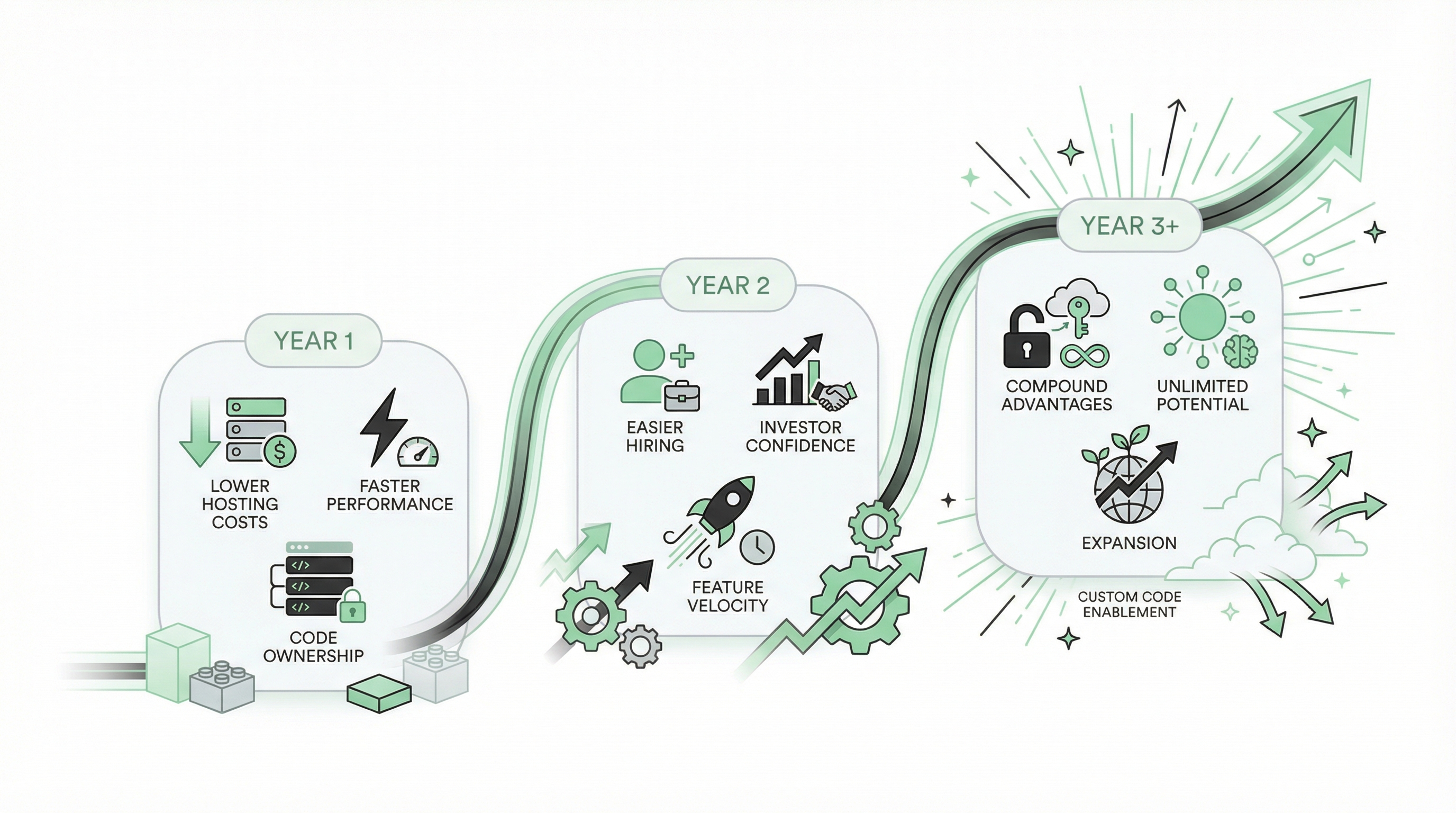
The Path Forward: What Happens After Migration
Migration isn't just about escaping Bubble's costs and limitations. It's about what becomes possible after you own your code.
Month 1: Immediate Benefits
- Performance: 3-5x faster load times
- Cost: 70-95% reduction in hosting bills
- Confidence: You own your code, no vendor lock-in
- Hiring: You can now recruit from the global dev pool
Month 3-6: Compounding Advantages
- Features: You ship faster (no Bubble workarounds)
- Integrations: Any API is now 10 minutes of work
- Customization: You're not constrained by plugins
- Scale: Your infrastructure costs are predictable
Month 12+: Strategic Positioning
- Funding: Investors see a real tech stack, not a Bubble liability
- Acquisition: Your app is worth 20-30% more without Bubble
- Team: You've hired developers who wouldn't have touched Bubble
- Product: You've shipped features that would've been impossible on Bubble
"I never thought of going back to bubble" — munaeemmmm, months after migration
That's not lock-in talking. That's someone who discovered what building without artificial constraints feels like.
Ready to Migrate?
If you're ready to move from Bubble to modern code—or want to understand what migration would involve for your specific app—we can help.
Get a free migration assessment →
We'll review your Bubble app and provide:
- Detailed migration plan (step-by-step)
- Timeline estimate (hours, not months)
- Cost breakdown (upfront and ongoing)
- Risk assessment (potential gotchas)
- ROI projection (cost savings over 1-3 years)
If migration doesn't make sense yet, we'll tell you. We'd rather help you make the right decision than sell you a service you don't need.
Related reading:
Ready to talk migration?
Get a free assessment of your Bubble app. We'll tell you exactly what to expect — timeline, cost, and any potential challenges.