
All templates
Food & Delivery
5.5k installs on Bubble

FoodDash – Restaurant Ordering

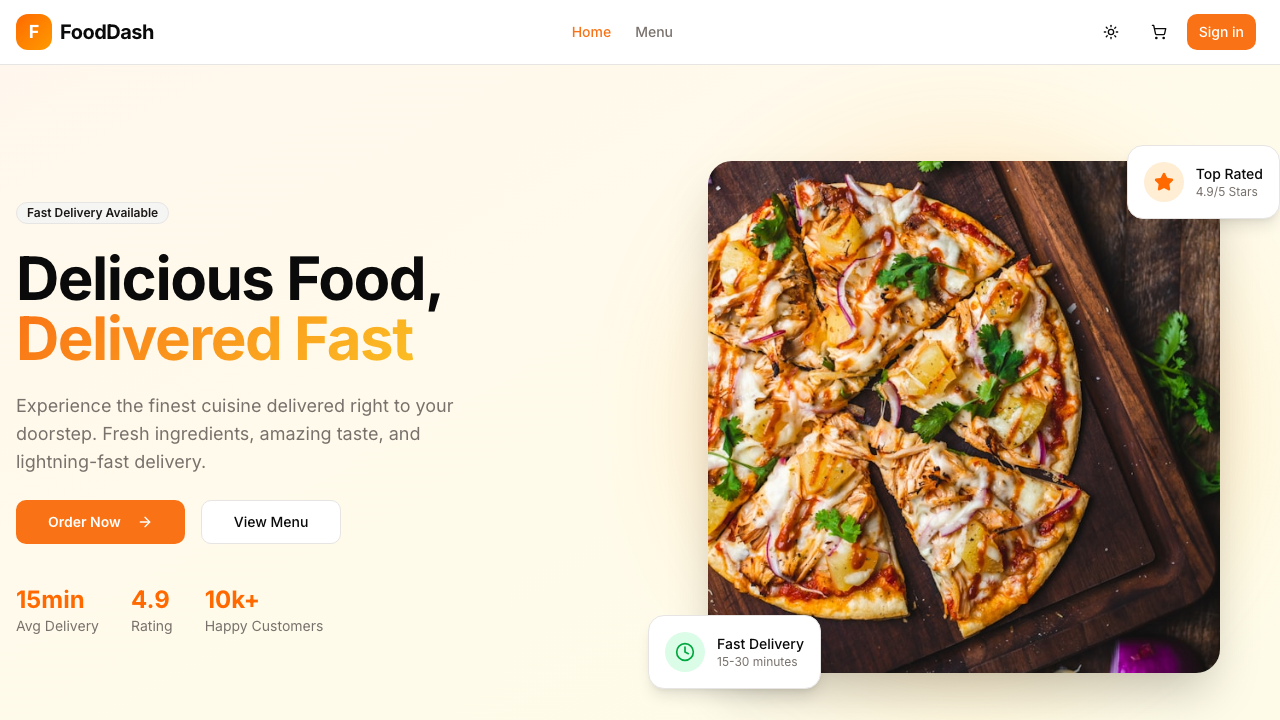
The Restaurant Ordering & Delivery template is one of Bubble.io's most popular free templates with 5.5K installs. It includes a customer-facing menu, multi-item cart, checkout, and an admin order management dashboard. We rebuilt every page from scratch using Next.js 15 App Router, Supabase (Auth + PostgreSQL + Realtime), shadcn/ui, and Tailwind CSS. The result features a beautiful food-focused customer experience plus a full admin dashboard — loading 15× faster at a fraction of the cost.

Before & After

Switch between the live Bubble original and the Next.js rebuild — same screen, same data, wildly different performance.
Performance comparison

Load time
< 0.9s

Down from 10–14s on Bubble

Monthly cost
$25/mo

Down from $349/mo on Bubble

Ownership
100%

Your code, your infra — no vendor lock-in

What's included

  • Email/password auth (Supabase Auth) — login, signup with role-based access (customer/admin)
  • Landing page — hero, featured menu items, restaurant info, testimonials
  • Menu page — food items grid with category tabs, search bar, dietary filters (vegetarian, vegan, gluten-free, spicy)
  • Item detail — large image, description, size/topping customization, add to cart
  • Cart — slide-out panel with quantity controls, order summary, running total
  • Checkout — delivery address form, order notes, order placement
  • Real-time order tracking — live status updates (Placed → Preparing → On the Way → Delivered) via Supabase Realtime
  • Admin orders — live order feed, status management (accept/prepare/dispatch/deliver), order details
  • Admin menu management — full CRUD for menu items (name, price, category, image, dietary tags, availability)
  • Admin stats dashboard — revenue metrics, order count, popular items
  • Dark/light mode via next-themes
  • Responsive design — mobile-first customer pages, desktop-first admin
  • Framer Motion entrance animations

Real code

This isn't a mockup — it's the actual source. Click any tab to explore key files.

app/(customer)/menu/page.tsx
'use client';

"color:#ff7b72">import { useEffect, useState, useMemo } "color:#ff7b72">from 'react';
"color:#ff7b72">import { useSearchParams } "color:#ff7b72">from 'next/navigation';
"color:#ff7b72">import Link "color:#ff7b72">from 'next/link';
"color:#ff7b72">import Image "color:#ff7b72">from 'next/image';
"color:#ff7b72">import { motion, AnimatePresence } "color:#ff7b72">from 'framer-motion';
"color:#ff7b72">import { Search, ChefHat, Leaf, Flame, WheatOff, Filter } "color:#ff7b72">from 'lucide-react';

"color:#ff7b72">import { Button } "color:#ff7b72">from '@/components/ui/button';
"color:#ff7b72">import { Input } "color:#ff7b72">from '@/components/ui/input';
"color:#ff7b72">import { Card, CardContent } "color:#ff7b72">from '@/components/ui/card';
"color:#ff7b72">import { Badge } "color:#ff7b72">from '@/components/ui/badge';
"color:#ff7b72">import { Tabs, TabsList, TabsTrigger } "color:#ff7b72">from '@/components/ui/tabs';
"color:#ff7b72">import { createClient } "color:#ff7b72">from '@/lib/supabase/client';
"color:#ff7b72">import { formatPrice } "color:#ff7b72">from '@/lib/utils';

"color:#ff7b72">export "color:#ff7b72">default "color:#ff7b72">function MenuPage() {
  "color:#ff7b72">const searchParams = useSearchParams();
  "color:#ff7b72">const [menuItems, setMenuItems] = useState([]);
  "color:#ff7b72">const [categories, setCategories] = useState([]);
  "color:#ff7b72">const [loading, setLoading] = useState("color:#ff7b72">true);
  "color:#ff7b72">const [searchQuery, setSearchQuery] = useState('');
  "color:#ff7b72">const [selectedCategory, setSelectedCategory] = useState('all');
  "color:#ff7b72">const [filters, setFilters] = useState({
    vegetarian: "color:#ff7b72">false, vegan: "color:#ff7b72">false, glutenFree: "color:#ff7b72">false, spicy: "color:#ff7b72">false,
  });

  useEffect(() => {
    "color:#ff7b72">async "color:#ff7b72">function load() {
      "color:#ff7b72">const supabase = createClient();
      "color:#ff7b72">const [{ data: items }, { data: cats }] = "color:#ff7b72">await Promise.all([
        supabase."color:#ff7b72">from('menu_items').select('*').eq('available', "color:#ff7b72">true).order('sort_order'),
        supabase."color:#ff7b72">from('categories').select('*').order('sort_order'),
      ]);
      setMenuItems(items || []);
      setCategories(cats || []);
      setLoading("color:#ff7b72">false);
    }
    load();
  }, []);

  "color:#ff7b72">const filtered = useMemo(() => {
    "color:#ff7b72">return menuItems.filter((item) => {
      "color:#ff7b72">if (selectedCategory !== 'all' && item.category_id !== selectedCategory) "color:#ff7b72">return "color:#ff7b72">false;
      "color:#ff7b72">if (searchQuery && !item.title.toLowerCase().includes(searchQuery.toLowerCase())) "color:#ff7b72">return "color:#ff7b72">false;
      "color:#ff7b72">return "color:#ff7b72">true;
    });
  }, [menuItems, selectedCategory, searchQuery, filters]);

  "color:#ff7b72">return (
    <div className="container py-8">
      <div className="flex flex-col md:flex-row gap-4 mb-8">
        <div className="relative flex-1">
          <Search className="absolute left-3 top-1/2 -translate-y-1/2 h-4 w-4 text-muted-foreground" />
          <Input placeholder="Search menu..." className="pl-10"
            value={searchQuery} onChange={(e) => setSearchQuery(e.target.value)} />
        </div>
      </div>
      <Tabs value={selectedCategory} onValueChange={setSelectedCategory}>
        <TabsList>
          <TabsTrigger value="all">All</TabsTrigger>
          {categories.map((cat) => (
            <TabsTrigger key={cat.id} value={cat.id}>{cat.name}</TabsTrigger>
          ))}
        </TabsList>
      </Tabs>
      <div className="grid grid-cols-1 sm:grid-cols-2 lg:grid-cols-3 gap-6 mt-6">
        <AnimatePresence>
          {filtered.map((item) => (
            <motion.div key={item.id} layout initial={{ opacity: 0 }} animate={{ opacity: 1 }}>
              <Link href={"color:#a5d6ff">`/menu/${item.id}`}>
                <Card className="overflow-hidden hover:shadow-lg transition-shadow">
                  <div className="aspect-video relative bg-muted">
                    {item.image_url && <Image src={item.image_url} alt={item.title} fill className="object-cover" />}
                  </div>
                  <CardContent className="p-4">
                    <h3 className="font-semibold">{item.title}</h3>
                    <p className="text-sm text-muted-foreground line-clamp-2">{item.description}</p>
                    <p className="text-lg font-bold mt-2 text-primary">{formatPrice(item.price)}</p>
                  </CardContent>
                </Card>
              </Link>
            </motion.div>
          ))}
        </AnimatePresence>
      </div>
    </div>
  );
}

Ready to migrate your Bubble app?

We rebuild your specific Bubble app — not a generic template. Book a free 15-minute call to get a scope and fixed price.

AB
Made byAbhi